> ## Documentation Index
> Fetch the complete documentation index at: https://manual.seahorse.dnotitia.ai/llms.txt
> Use this file to discover all available pages before exploring further.
> Storage 목록 — 이름·연결 Table·API URL·Endpoint·생성일을 한눈에 조회하고 상세로 이동
# Storage list
# Storage 목록
**경로**: Console 좌측 네비게이션 → **Storage**
전체 Storage 목록을 조회하고, 개별 Storage 의 연결 Table·API URL·임베딩 Endpoint·생성일을 확인합니다.
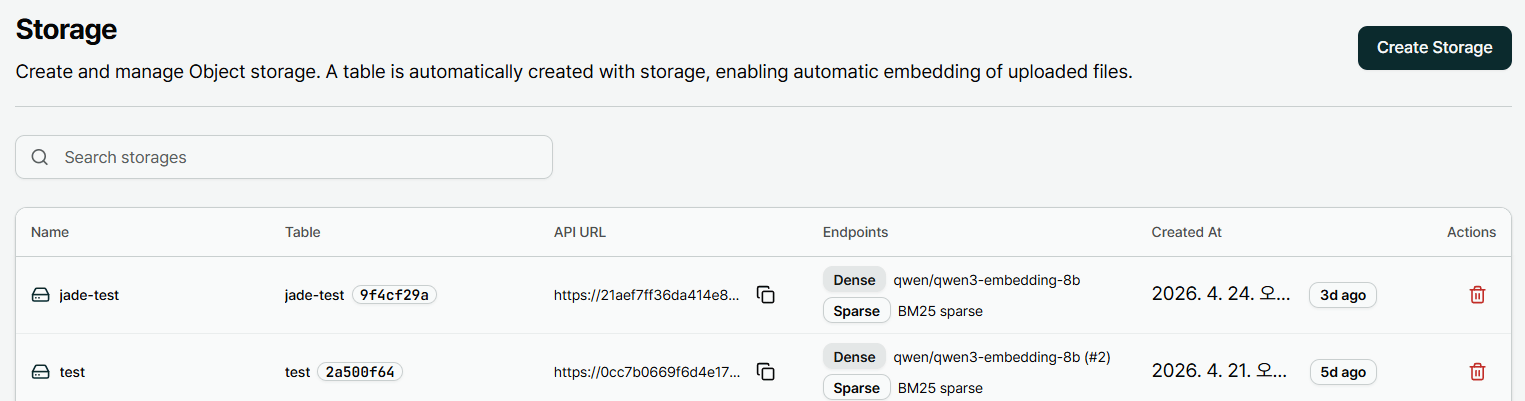 ## 헤더 영역
| 요소 | 설명 |
| ------------------- | ---------------------------------------------------------------------------------------------------------------------------------------------------------------------------------------------- |
| **Storage** (타이틀) | 페이지 제목 |
| 설명 텍스트 | `Create and manage Object storage. A table is automatically created with storage, enabling automatic embedding of uploaded files.` — Storage 생성 시 Table 이 자동 생성되며, 업로드된 파일이 자동 임베딩된다는 핵심 기능 안내 |
| **Create Storage** | 우측 상단 버튼 → [Storage 생성](/console/storage/storage-create) |
| **Search storages** | 실시간 필터 입력 |
## 목록 컬럼
| 컬럼 | 설명 | 예시 |
| -------------- | ------------------------------------ | ------------------------------------------------------------------- |
| **Name** | Storage 이름 | `test`, `jh-7994`, `tobis` |
| **Table** | 자동 생성·연결된 Table 이름 + UUID 칩 | `test2a500f64` |
| **API URL** | Storage 전용 API 엔드포인트 URL (복사 아이콘) | `https://0cc7b0669f6d4e17bb8227c218ae7af0.api.seahorse.dnotitia.ai` |
| **Endpoints** | Dense / Sparse 임베딩 Endpoint 요약 — 2 줄 | `Dense: qwen/qwen3-embedding-8b` / `Sparse: BM25 sparse` |
| **Created At** | 생성 일시 (절대) + 상대 시간 뱃지 | `2026. 4. 21. 오후 7:35:13` · `18h ago` |
| **Actions** | 행 삭제 아이콘 | 🗑 (빨강) |
**Endpoints 컬럼** 은 Storage 생성 시 선택한 임베딩 모델을 보여줍니다. 기본 조합은 `qwen/qwen3-embedding-8b` (Dense) + `BM25 sparse` (Sparse) 입니다. Storage 별로 모델을 다르게 지정할 수 있으며, 생성 후 **변경 불가**.
## 동작
* **행 클릭** → [Storage 상세](/console/storage/storage-detail) 로 이동
* **API URL 복사 아이콘** → 엔드포인트 URL 을 클립보드에 복사 (CLI·SDK·외부 연동 시 사용)
* **🗑 Actions** → [Storage 삭제](/console/storage/storage-delete) 확인 다이얼로그 (컨테이너 전체 삭제, 내부 파일 삭제와는 별개)
* **Search storages** → Name / Table 이름 / UUID / URL 기준 실시간 필터
## 페이지네이션
목록은 페이지 단위로 제공됩니다.
* 하단에 `< Previous · 1 · 2 · Next >` 컨트롤
* 페이지당 기본 10 개 표시
**Storage 수정 기능은 제공되지 않습니다.** 행 Actions 에는 **Delete** 만 제공되며, 이름·Endpoint·Index 설정을 바꾸려면 새 Storage 를 만들어 파일을 이관한 뒤 기존 Storage 를 삭제하세요. 자세한 내용: [Storage 기능 개요](/console/storage)
## 관련 문서
* [Storage 생성](/console/storage/storage-create)
* [Storage 상세 & 파일 업로드](/console/storage/storage-detail)
* [Storage 삭제](/console/storage/storage-delete)
* [Semantic Search](/console/semantic-search) — Storage 에서 생성된 Table 만 검색 가능
## 헤더 영역
| 요소 | 설명 |
| ------------------- | ---------------------------------------------------------------------------------------------------------------------------------------------------------------------------------------------- |
| **Storage** (타이틀) | 페이지 제목 |
| 설명 텍스트 | `Create and manage Object storage. A table is automatically created with storage, enabling automatic embedding of uploaded files.` — Storage 생성 시 Table 이 자동 생성되며, 업로드된 파일이 자동 임베딩된다는 핵심 기능 안내 |
| **Create Storage** | 우측 상단 버튼 → [Storage 생성](/console/storage/storage-create) |
| **Search storages** | 실시간 필터 입력 |
## 목록 컬럼
| 컬럼 | 설명 | 예시 |
| -------------- | ------------------------------------ | ------------------------------------------------------------------- |
| **Name** | Storage 이름 | `test`, `jh-7994`, `tobis` |
| **Table** | 자동 생성·연결된 Table 이름 + UUID 칩 | `test2a500f64` |
| **API URL** | Storage 전용 API 엔드포인트 URL (복사 아이콘) | `https://0cc7b0669f6d4e17bb8227c218ae7af0.api.seahorse.dnotitia.ai` |
| **Endpoints** | Dense / Sparse 임베딩 Endpoint 요약 — 2 줄 | `Dense: qwen/qwen3-embedding-8b` / `Sparse: BM25 sparse` |
| **Created At** | 생성 일시 (절대) + 상대 시간 뱃지 | `2026. 4. 21. 오후 7:35:13` · `18h ago` |
| **Actions** | 행 삭제 아이콘 | 🗑 (빨강) |
**Endpoints 컬럼** 은 Storage 생성 시 선택한 임베딩 모델을 보여줍니다. 기본 조합은 `qwen/qwen3-embedding-8b` (Dense) + `BM25 sparse` (Sparse) 입니다. Storage 별로 모델을 다르게 지정할 수 있으며, 생성 후 **변경 불가**.
## 동작
* **행 클릭** → [Storage 상세](/console/storage/storage-detail) 로 이동
* **API URL 복사 아이콘** → 엔드포인트 URL 을 클립보드에 복사 (CLI·SDK·외부 연동 시 사용)
* **🗑 Actions** → [Storage 삭제](/console/storage/storage-delete) 확인 다이얼로그 (컨테이너 전체 삭제, 내부 파일 삭제와는 별개)
* **Search storages** → Name / Table 이름 / UUID / URL 기준 실시간 필터
## 페이지네이션
목록은 페이지 단위로 제공됩니다.
* 하단에 `< Previous · 1 · 2 · Next >` 컨트롤
* 페이지당 기본 10 개 표시
**Storage 수정 기능은 제공되지 않습니다.** 행 Actions 에는 **Delete** 만 제공되며, 이름·Endpoint·Index 설정을 바꾸려면 새 Storage 를 만들어 파일을 이관한 뒤 기존 Storage 를 삭제하세요. 자세한 내용: [Storage 기능 개요](/console/storage)
## 관련 문서
* [Storage 생성](/console/storage/storage-create)
* [Storage 상세 & 파일 업로드](/console/storage/storage-detail)
* [Storage 삭제](/console/storage/storage-delete)
* [Semantic Search](/console/semantic-search) — Storage 에서 생성된 Table 만 검색 가능