> ## Documentation Index
> Fetch the complete documentation index at: https://manual.seahorse.dnotitia.ai/llms.txt
> Use this file to discover all available pages before exploring further.
# index
> 시맨틱 검색 (Semantic Search) 는 키워드가 아닌 의미 기반 으로 문서를 검색하는 기능입니다 . 벡터 임베딩을 통해 검색어와 문서의 의미적 유사도를 계산하므로 , 정확히 같은 단어가 없어도 비슷한 의미의 결과를 찾을 수 있습니다
# Semantic Search 기능
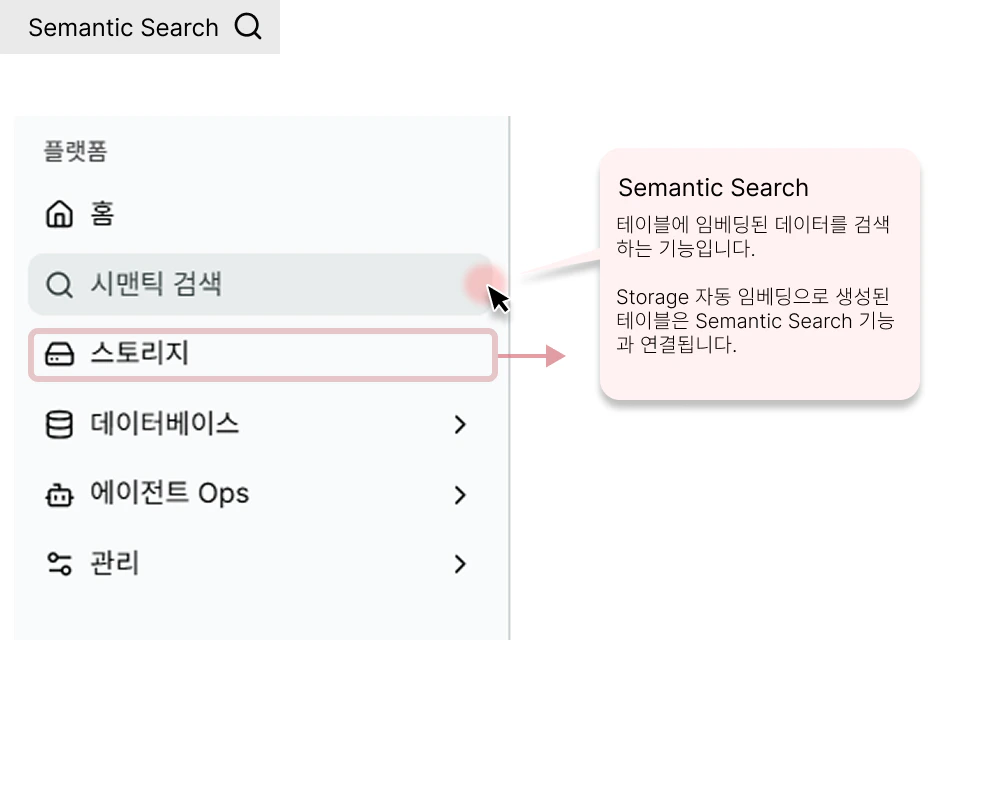
시맨틱 검색 (Semantic Search) 는 키워드가 아닌 **의미 기반** 으로 문서를 검색하는 기능입니다 . 벡터 임베딩을 통해 검색어와 문서의 의미적 유사도를 계산하므로 , 정확히 같은 단어가 없어도 비슷한 의미의 결과를 찾을 수 있습니다 .
**경로**: Console → **Semantic Search**
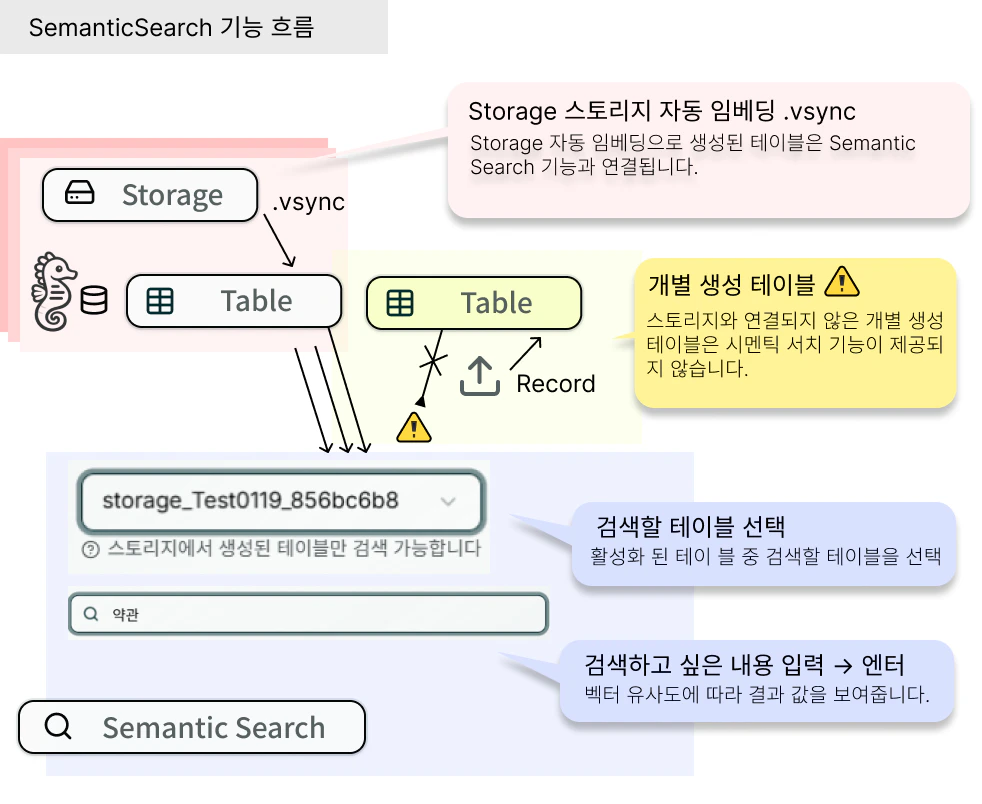
**사전 요구사항** : Storage → Table 자동 생성 → 데이터 업로드 완료
 ## 처음 진입 시 (Empty State)
검색 가능한 Storage Table 이 없으면 검색 폼 대신 **온보딩 가이드** 가 표시됩니다.
```text theme={null}
Welcome! Let's get started with Semantic Search
No searchable Storage Table found. Follow the steps below to get started.
```
| 단계 | 제목 | 설명 |
| ----- | --------------------- | -------------------------------------------------- |
| **1** | **Create Storage** | Create a storage to store your documents and files |
| **2** | **Configure Storage** | Auto-embedding will be enabled |
| **3** | **Upload Data** | Upload content to search |
| **4** | **Semantic Search** | Search documents with natural language |
하단 버튼: **Create Storage** → [Storage 생성](/console/storage/storage-create) · **Run Quick Start** → [퀵스타트 투어](/console/home/main)
시맨틱 검색은 **Storage 에서 자동 생성된 Table 만** 검색 대상입니다. [수동 생성 Table](/console/database/tables/table-create) 은 검색 후보에 나타나지 않습니다.
## Semantic Search Menu
Semantic Search 결과 화면 — 파일 타입 탭, 결과 카드(순위·점수·메타데이터), JSON 복사
## 관련 문서
* [Console (콘솔)](/)
* [Agent Ops Menu Group](/console/agent-ops)
* [Database Menu Group](/console/database)
* [Console 활용 가이드](/console/guides)
* [Home](/console/home)
* [MANAGEMENT Menu Group](/console/management)
## 처음 진입 시 (Empty State)
검색 가능한 Storage Table 이 없으면 검색 폼 대신 **온보딩 가이드** 가 표시됩니다.
```text theme={null}
Welcome! Let's get started with Semantic Search
No searchable Storage Table found. Follow the steps below to get started.
```
| 단계 | 제목 | 설명 |
| ----- | --------------------- | -------------------------------------------------- |
| **1** | **Create Storage** | Create a storage to store your documents and files |
| **2** | **Configure Storage** | Auto-embedding will be enabled |
| **3** | **Upload Data** | Upload content to search |
| **4** | **Semantic Search** | Search documents with natural language |
하단 버튼: **Create Storage** → [Storage 생성](/console/storage/storage-create) · **Run Quick Start** → [퀵스타트 투어](/console/home/main)
시맨틱 검색은 **Storage 에서 자동 생성된 Table 만** 검색 대상입니다. [수동 생성 Table](/console/database/tables/table-create) 은 검색 후보에 나타나지 않습니다.
## Semantic Search Menu
Semantic Search 결과 화면 — 파일 타입 탭, 결과 카드(순위·점수·메타데이터), JSON 복사
## 관련 문서
* [Console (콘솔)](/)
* [Agent Ops Menu Group](/console/agent-ops)
* [Database Menu Group](/console/database)
* [Console 활용 가이드](/console/guides)
* [Home](/console/home)
* [MANAGEMENT Menu Group](/console/management)