> ## Documentation Index
> Fetch the complete documentation index at: https://manual.seahorse.dnotitia.ai/llms.txt
> Use this file to discover all available pages before exploring further.
> Export Key 수정
# Exportkey update
# Export Key 수정
## 개요
등록된 공개키의 설정을 수정합니다.
## 경로
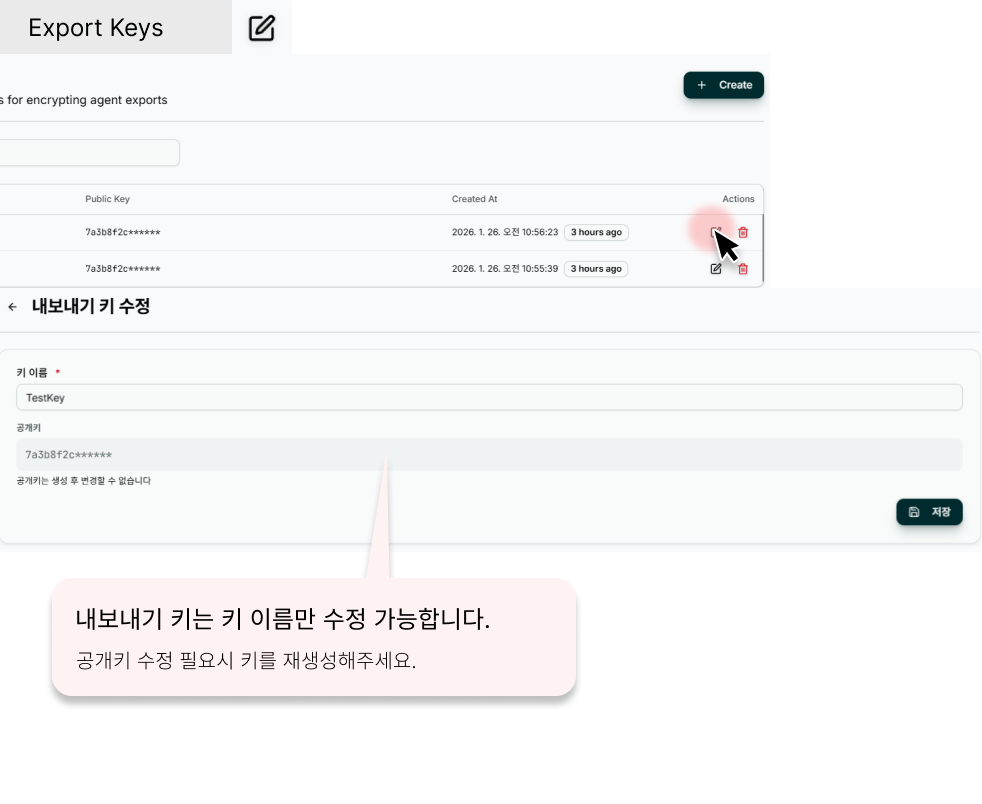
**경로**: Console → **Management** → **Export Keys** → 키 이름 클릭 → 우측 상단 **EDIT** 버튼
 * 공개키 내용을 변경하면 해당 키를 사용하는 에이전트의 인증에 즉시 영향을 미칩니다.
* 키 비활성화 시 할당된 에이전트가 해당 키로 인증할 수 없게 됩니다.
## 화면 구성
생성 페이지와 동일한 필드 구성으로, 기존 값이 미리 채워져 있습니다.
## 수정 가능 항목
* 기본 정보 (이름/설명 등)
* 세부 설정 (권한/옵션)
## 절차
1. 대상 목록 또는 상세에서 **\[수정]** 클릭
2. 값 변경 후 **\[저장]** 클릭
3. 변경 이력 기록
운영 중인 리소스를 수정하면 연결된 에이전트·세션에 영향이 있을 수 있습니다.
* 공개키 내용을 변경하면 해당 키를 사용하는 에이전트의 인증에 즉시 영향을 미칩니다.
* 키 비활성화 시 할당된 에이전트가 해당 키로 인증할 수 없게 됩니다.
## 화면 구성
생성 페이지와 동일한 필드 구성으로, 기존 값이 미리 채워져 있습니다.
## 수정 가능 항목
* 기본 정보 (이름/설명 등)
* 세부 설정 (권한/옵션)
## 절차
1. 대상 목록 또는 상세에서 **\[수정]** 클릭
2. 값 변경 후 **\[저장]** 클릭
3. 변경 이력 기록
운영 중인 리소스를 수정하면 연결된 에이전트·세션에 영향이 있을 수 있습니다.