> ## Documentation Index
> Fetch the complete documentation index at: https://manual.seahorse.dnotitia.ai/llms.txt
> Use this file to discover all available pages before exploring further.
> API KEY 목록
# Apikey list
# API Key 목록
**경로**: Console → **Management → API Keys**
`Issue and manage keys for Seahorse API access`
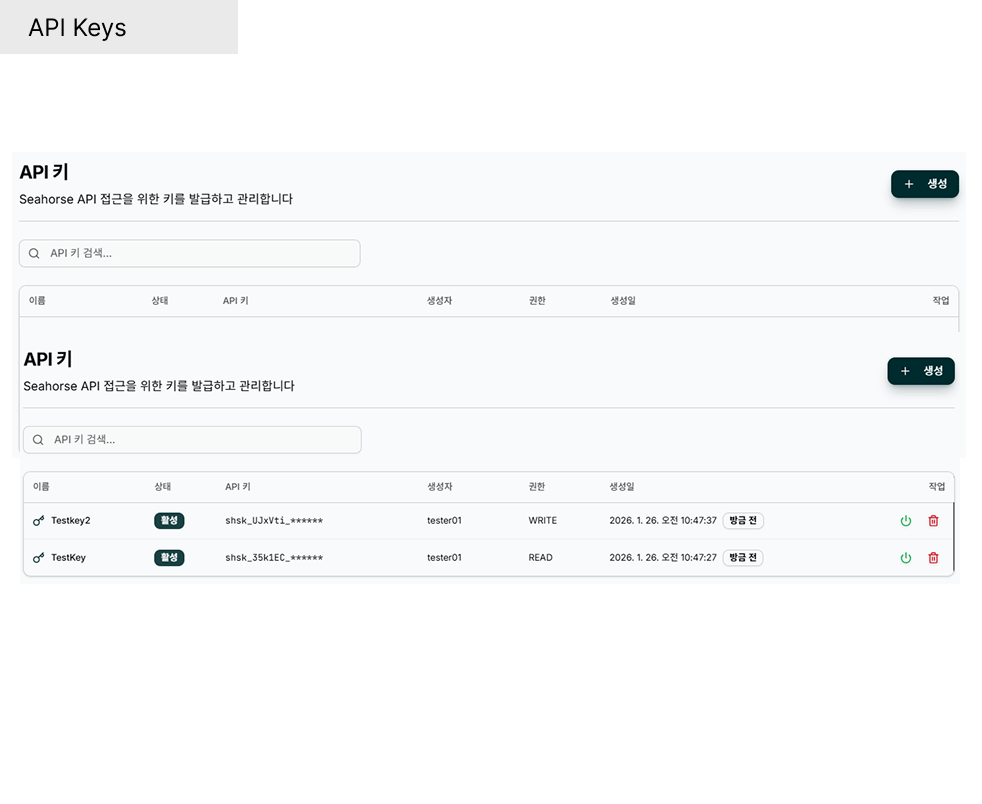 ## 헤더
| 요소 | 설명 |
| ----------------------------------------------- | ------------------------------------------------------------------ |
| **API Keys** (타이틀) | 페이지 제목 |
| `Issue and manage keys for Seahorse API access` | 부제 |
| **Create API Key** (우측 상단) | 신규 키 발급 → [API Key 생성](/console/management/api-keys/apikey-create) |
| **Search API keys…** | 이름·키 접두사 실시간 필터 |
## 목록 컬럼
| 컬럼 | 설명 | 예시 |
| -------------- | ----------------------------------- | ----------------------------------------- |
| **Name** | API Key 이름 (사용자 지정) | `temp-test`, `jade-test-2`, `jh-d-custom` |
| **Status** | 활성화 상태 | `Active` (녹색) / `Inactive` (회색) |
| **API Key** | 키 값 **마스킹** 표시 (접두사 + 뒷부분 `******`) | `shsk_ZvZRfD_******` |
| **Created By** | 생성자 이메일 | `admin@dnotitia.com` |
| **Permission** | 권한 범위 | `READ` / `WRITE` |
| **Created At** | 생성 시각 (절대 + 상대) | `2026. 4. 21. 오후 5:29:48` · `1 days ago` |
| **Actions** | 활성/비활성 토글 · 🗑 삭제 | Power Icon / Delete Icon |
**API Key 컬럼은 항상 마스킹** 상태로 표시됩니다 (예: `shsk_ZvZRfD_******`). 전체 평문 값은 **생성 직후 한 번만 확인 가능** 하며 목록에서는 다시 조회할 수 없습니다. 내부 리소스 연결(에이전트·API) 시에는 목록에서 **선택** 해 사용하고, 외부 시스템에 쓸 평문은 생성 시점에 안전한 저장소로 이동하세요.
## 페이지네이션
하단에 `Previous · 1 · 2 · 3 · Next` 컨트롤. 키가 많으면 **Search API keys…** 로 이름·접두사 필터링이 빠릅니다.
## Status 값 · 아이콘
| 상태 | 표시 | 설명 |
| ------------ | ----------------------- | --------------------------------- |
| **Active** | 녹색 Chip + 회색 Power Icon | API Key 사용 가능 |
| **Inactive** | 회색 Chip + 녹색 Power Icon | 비활성 (사용 불가) — 다시 토글하면 Active 로 복귀 |
| 액션 아이콘 | 동작 |
| ----------------------- | ---------------------------------------------------------------- |
| **Power Icon** | 활성/비활성 토글 → 확인 다이얼로그 → 상태 변경 |
| **🗑 Delete Icon** (빨강) | 영구 삭제 → [API Key 삭제](/console/management/api-keys/apikey-delete) |
## 빈 목록 상태
API Key 가 하나도 없으면 `No API keys found` 안내가 표시됩니다. 우측 상단 **Create API Key** 로 첫 키 발급.
## 권한·보안 가이드
권한(Permission) 종류, 최소 권한 원칙, 키 값 관리, 유출 대응 절차 등 공통 가이드는 **API Keys 기능 개요** 에 정리되어 있습니다.
→ [API Keys 기능 — 권한 (Permission) · 보안 주의 사항](/console/management/api-keys#권한-permission)
## 관련 문서
* [API Key 생성](/console/management/api-keys/apikey-create)
* [API Key 삭제](/console/management/api-keys/apikey-delete)
* [API Key 상태 수정](/console/management/api-keys/update-status) — 활성/비활성 토글
* [API Keys 기능 개요](/console/management/api-keys) — 권한·보안 원칙
## 헤더
| 요소 | 설명 |
| ----------------------------------------------- | ------------------------------------------------------------------ |
| **API Keys** (타이틀) | 페이지 제목 |
| `Issue and manage keys for Seahorse API access` | 부제 |
| **Create API Key** (우측 상단) | 신규 키 발급 → [API Key 생성](/console/management/api-keys/apikey-create) |
| **Search API keys…** | 이름·키 접두사 실시간 필터 |
## 목록 컬럼
| 컬럼 | 설명 | 예시 |
| -------------- | ----------------------------------- | ----------------------------------------- |
| **Name** | API Key 이름 (사용자 지정) | `temp-test`, `jade-test-2`, `jh-d-custom` |
| **Status** | 활성화 상태 | `Active` (녹색) / `Inactive` (회색) |
| **API Key** | 키 값 **마스킹** 표시 (접두사 + 뒷부분 `******`) | `shsk_ZvZRfD_******` |
| **Created By** | 생성자 이메일 | `admin@dnotitia.com` |
| **Permission** | 권한 범위 | `READ` / `WRITE` |
| **Created At** | 생성 시각 (절대 + 상대) | `2026. 4. 21. 오후 5:29:48` · `1 days ago` |
| **Actions** | 활성/비활성 토글 · 🗑 삭제 | Power Icon / Delete Icon |
**API Key 컬럼은 항상 마스킹** 상태로 표시됩니다 (예: `shsk_ZvZRfD_******`). 전체 평문 값은 **생성 직후 한 번만 확인 가능** 하며 목록에서는 다시 조회할 수 없습니다. 내부 리소스 연결(에이전트·API) 시에는 목록에서 **선택** 해 사용하고, 외부 시스템에 쓸 평문은 생성 시점에 안전한 저장소로 이동하세요.
## 페이지네이션
하단에 `Previous · 1 · 2 · 3 · Next` 컨트롤. 키가 많으면 **Search API keys…** 로 이름·접두사 필터링이 빠릅니다.
## Status 값 · 아이콘
| 상태 | 표시 | 설명 |
| ------------ | ----------------------- | --------------------------------- |
| **Active** | 녹색 Chip + 회색 Power Icon | API Key 사용 가능 |
| **Inactive** | 회색 Chip + 녹색 Power Icon | 비활성 (사용 불가) — 다시 토글하면 Active 로 복귀 |
| 액션 아이콘 | 동작 |
| ----------------------- | ---------------------------------------------------------------- |
| **Power Icon** | 활성/비활성 토글 → 확인 다이얼로그 → 상태 변경 |
| **🗑 Delete Icon** (빨강) | 영구 삭제 → [API Key 삭제](/console/management/api-keys/apikey-delete) |
## 빈 목록 상태
API Key 가 하나도 없으면 `No API keys found` 안내가 표시됩니다. 우측 상단 **Create API Key** 로 첫 키 발급.
## 권한·보안 가이드
권한(Permission) 종류, 최소 권한 원칙, 키 값 관리, 유출 대응 절차 등 공통 가이드는 **API Keys 기능 개요** 에 정리되어 있습니다.
→ [API Keys 기능 — 권한 (Permission) · 보안 주의 사항](/console/management/api-keys#권한-permission)
## 관련 문서
* [API Key 생성](/console/management/api-keys/apikey-create)
* [API Key 삭제](/console/management/api-keys/apikey-delete)
* [API Key 상태 수정](/console/management/api-keys/update-status) — 활성/비활성 토글
* [API Keys 기능 개요](/console/management/api-keys) — 권한·보안 원칙