> ## Documentation Index
> Fetch the complete documentation index at: https://manual.seahorse.dnotitia.ai/llms.txt
> Use this file to discover all available pages before exploring further.
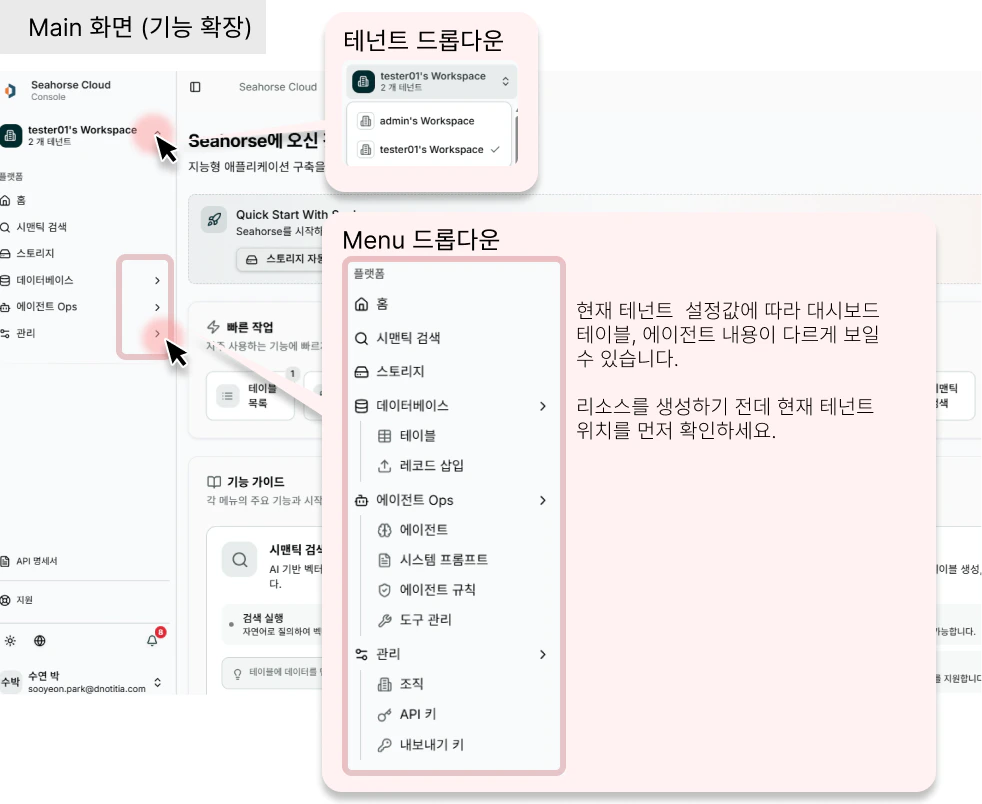
> Seahorse Cloud 좌측 네비게이션 — 기능별 메뉴 트리 (Home / Semantic Search / Storage / Database / Agent Ops / Management)
# Navigation
# 좌측 네비게이션
## 화면 정보
좌측 네비게이션은 기능별메뉴 트리로, Seahorse Cloud의 모든 주요 기능에 접근하는 메인 게이트웨이입니다. 테넌트 별로 표시되는 리소스가 다를 수 있으니 상단 테넌트를 확인해주세요.
 ## 좌측 메뉴 구조
좌측 네비게이션은 **단일 메뉴 3 개 + 기능 그룹 3 개** 로 구성됩니다.
| 구분 | 메뉴 | 이동 |
| ----------------- | ----------------------------------------------------------- | ------------------------------------------- |
| 단일 메뉴 | Home | [Home](/console/home) |
| 단일 메뉴 | Semantic Search | [Semantic Search](/console/semantic-search) |
| 단일 메뉴 | Storage | [Storage](/console/storage) |
| **Database** 그룹 | Tables / Insert Records | [Database](/console/database) |
| **Agent Ops** 그룹 | Agent / Tools / System Prompts / Agent Rules *(On-prem 전용)* | [Agent Ops](/console/agent-ops) |
| **Management** 그룹 | Organization / API Keys / Export Key | [Management](/console/management) |
테넌트에 따라 보이는 리소스가 다릅니다. 상단 **테넌트 드롭다운** 에서 현재 작업 중인 테넌트를 먼저 확인하세요.
## 메뉴 그룹별 상세 설명
### 단일 기능 메뉴 (상단 3 개)
전체 시스템의 진입점 및 통합 기능을 제공합니다.
| 메뉴 | 필요 데이터 | 기능 | 대표 동작 |
| ------------------------------------------- | ------ | -------------------- | ----------- |
| [Home](/console/home) | 없음 | 시스템 소개 및 빠른 시작 가이드 | 신규 사용자 온보딩 |
| [Semantic Search](/console/semantic-search) | Table | 통합 시맨틱 검색 인터페이스 | Table 빠른 검색 |
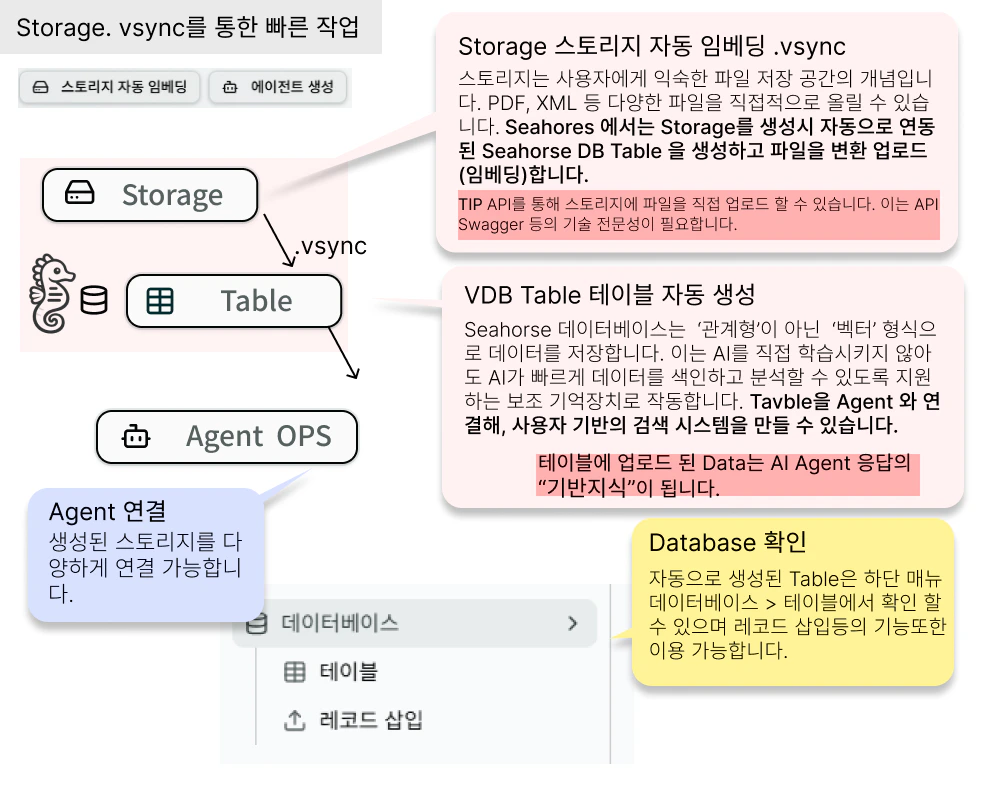
| [Storage](/console/storage) | — | 파일 업로드 + 스토리지 자동 임베딩 | 스토리지 생성·업로드 |
### Database 그룹 (데이터베이스 메뉴)
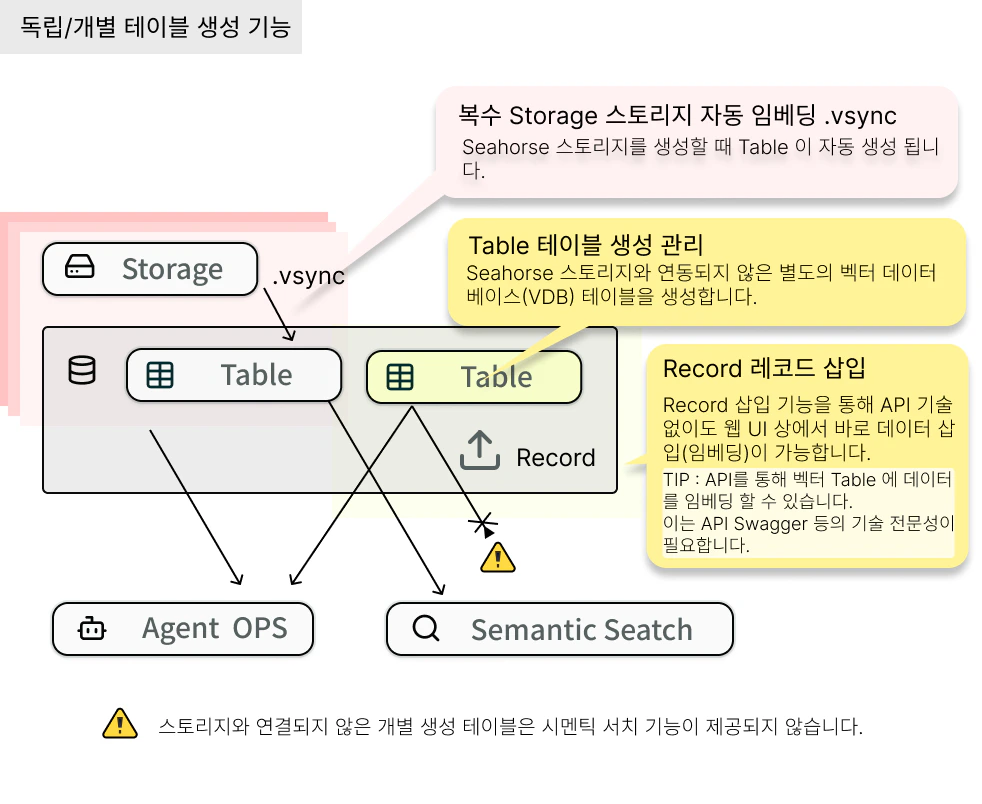
벡터 데이터베이스 및 관련 리소스를 관리하는 핵심 메뉴입니다.
| 메뉴 | 설명 | 이동 |
| -------------- | -------------- | ----------------------------------- |
| Tables | 벡터 Table 생성·관리 | [Tables](/console/database/tables) |
| Insert Records | 레코드(벡터) CRUD | [Insert Records](/console/database) |
**사용 흐름**
## 좌측 메뉴 구조
좌측 네비게이션은 **단일 메뉴 3 개 + 기능 그룹 3 개** 로 구성됩니다.
| 구분 | 메뉴 | 이동 |
| ----------------- | ----------------------------------------------------------- | ------------------------------------------- |
| 단일 메뉴 | Home | [Home](/console/home) |
| 단일 메뉴 | Semantic Search | [Semantic Search](/console/semantic-search) |
| 단일 메뉴 | Storage | [Storage](/console/storage) |
| **Database** 그룹 | Tables / Insert Records | [Database](/console/database) |
| **Agent Ops** 그룹 | Agent / Tools / System Prompts / Agent Rules *(On-prem 전용)* | [Agent Ops](/console/agent-ops) |
| **Management** 그룹 | Organization / API Keys / Export Key | [Management](/console/management) |
테넌트에 따라 보이는 리소스가 다릅니다. 상단 **테넌트 드롭다운** 에서 현재 작업 중인 테넌트를 먼저 확인하세요.
## 메뉴 그룹별 상세 설명
### 단일 기능 메뉴 (상단 3 개)
전체 시스템의 진입점 및 통합 기능을 제공합니다.
| 메뉴 | 필요 데이터 | 기능 | 대표 동작 |
| ------------------------------------------- | ------ | -------------------- | ----------- |
| [Home](/console/home) | 없음 | 시스템 소개 및 빠른 시작 가이드 | 신규 사용자 온보딩 |
| [Semantic Search](/console/semantic-search) | Table | 통합 시맨틱 검색 인터페이스 | Table 빠른 검색 |
| [Storage](/console/storage) | — | 파일 업로드 + 스토리지 자동 임베딩 | 스토리지 생성·업로드 |
### Database 그룹 (데이터베이스 메뉴)
벡터 데이터베이스 및 관련 리소스를 관리하는 핵심 메뉴입니다.
| 메뉴 | 설명 | 이동 |
| -------------- | -------------- | ----------------------------------- |
| Tables | 벡터 Table 생성·관리 | [Tables](/console/database/tables) |
| Insert Records | 레코드(벡터) CRUD | [Insert Records](/console/database) |
**사용 흐름**
 ### Agent Ops 그룹 (에이전트 운영 메뉴)
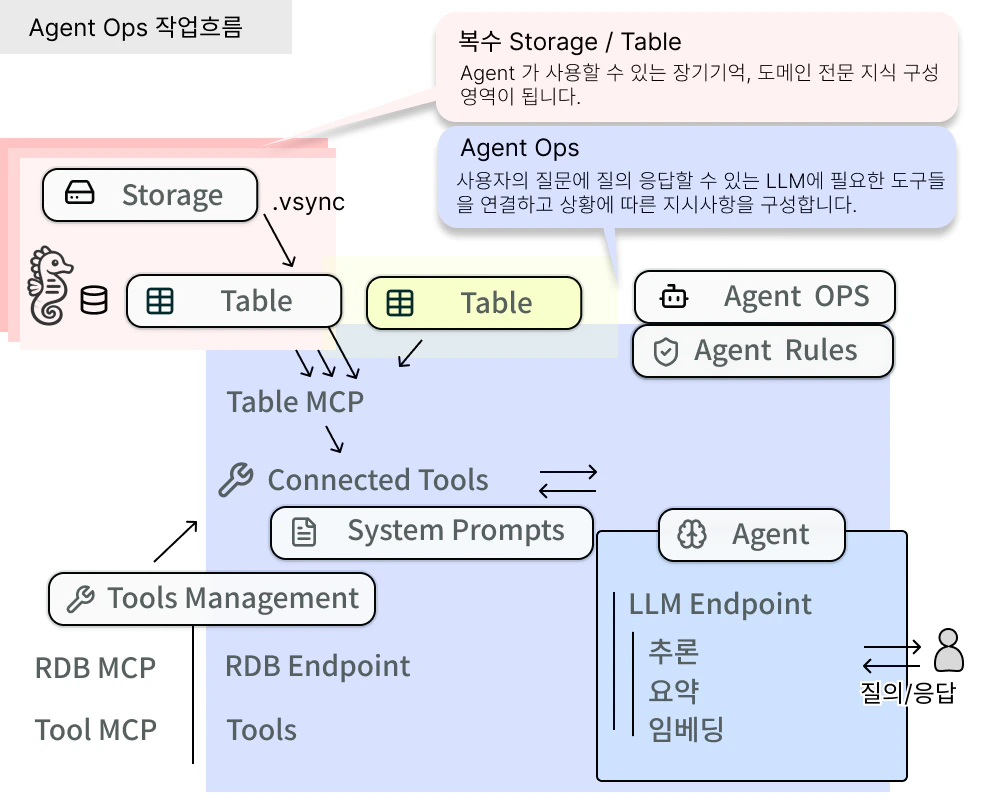
AI 에이전트와 Tool·Prompt 를 관리합니다.
| 메뉴 | 설명 | 이동 |
| -------------------------- | --------------------------------------------- | --------------------------------------------------- |
| Agent | 에이전트 생성·관리·배포 | [Agent](/console/agent-ops/agent) |
| Tools | MCP Tool 등록·관리 | [Tool Management](/console/agent-ops/agent-tool) |
| System Prompts | 에이전트 시스템 프롬프트 생성·관리 | [System Prompts](/console/agent-ops/system-prompts) |
| Agent Rules *(On-prem 전용)* | 에이전트 사용 규칙 — Cloud UI 비활성, On-prem 환경에서 별도 상담 | — |
### Agent Ops 그룹 (에이전트 운영 메뉴)
AI 에이전트와 Tool·Prompt 를 관리합니다.
| 메뉴 | 설명 | 이동 |
| -------------------------- | --------------------------------------------- | --------------------------------------------------- |
| Agent | 에이전트 생성·관리·배포 | [Agent](/console/agent-ops/agent) |
| Tools | MCP Tool 등록·관리 | [Tool Management](/console/agent-ops/agent-tool) |
| System Prompts | 에이전트 시스템 프롬프트 생성·관리 | [System Prompts](/console/agent-ops/system-prompts) |
| Agent Rules *(On-prem 전용)* | 에이전트 사용 규칙 — Cloud UI 비활성, On-prem 환경에서 별도 상담 | — |
 ### Management 그룹 (관리 메뉴)
조직·API 키·암호화 키 관리 기능을 제공합니다.
| 메뉴 | 설명 | 이동 |
| ------------ | ------------------- | ------------------------------------------------ |
| Organization | 조직 정보 및 멤버 관리 | [Organization](/console/management/organization) |
| API Keys | API Key 생성·권한·상태 관리 | [API Keys](/console/management/api-keys) |
| Export Key | 암호화 Key 생성·관리 | [Export Key](/console/management/export-keys) |
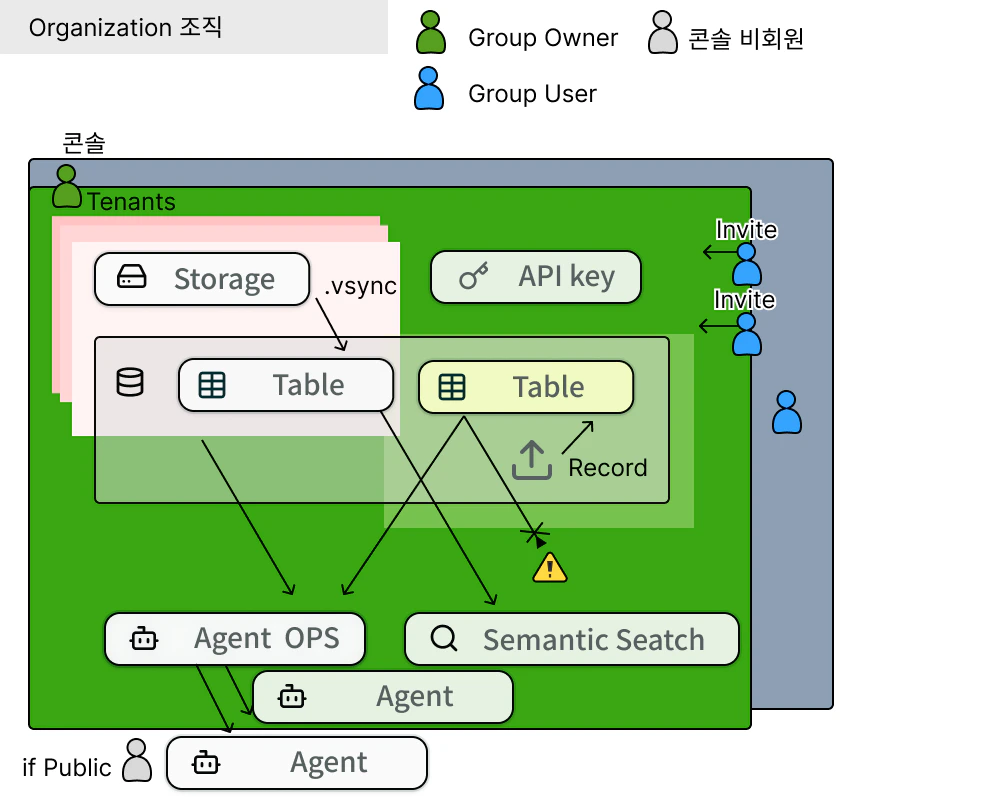
**Organization이란?**
여러 사용자가 Tenant와 리소스를 공유하는 그룹 단위입니다.
예: "ABC Corp" 조직 안에 개발팀, 운영팀 사용자들이 속함
### Management 그룹 (관리 메뉴)
조직·API 키·암호화 키 관리 기능을 제공합니다.
| 메뉴 | 설명 | 이동 |
| ------------ | ------------------- | ------------------------------------------------ |
| Organization | 조직 정보 및 멤버 관리 | [Organization](/console/management/organization) |
| API Keys | API Key 생성·권한·상태 관리 | [API Keys](/console/management/api-keys) |
| Export Key | 암호화 Key 생성·관리 | [Export Key](/console/management/export-keys) |
**Organization이란?**
여러 사용자가 Tenant와 리소스를 공유하는 그룹 단위입니다.
예: "ABC Corp" 조직 안에 개발팀, 운영팀 사용자들이 속함
 ## 네비게이션 사용 방법
1. **단일 메뉴 클릭** — 해당 화면으로 즉시 이동
* 예: `Storage` 클릭 → Storage 목록 화면
2. **그룹 메뉴 클릭** — 하위 메뉴 펼치기 / 접기
* 예: `Database` 클릭 → Tables, Insert Records 표시 / 숨김
3. **현재 활성 메뉴** — 회색 배경으로 강조 표시
기능이 어디에 있는지 모르겠다면 [활용 가이드](/console/guides) 의 시나리오별 "Console 구성 단계" 를 참고하세요. 페르소나별로 **어떤 메뉴를 어떤 순서로 쓰는지** 정리돼 있습니다.
## 네비게이션 사용 방법
1. **단일 메뉴 클릭** — 해당 화면으로 즉시 이동
* 예: `Storage` 클릭 → Storage 목록 화면
2. **그룹 메뉴 클릭** — 하위 메뉴 펼치기 / 접기
* 예: `Database` 클릭 → Tables, Insert Records 표시 / 숨김
3. **현재 활성 메뉴** — 회색 배경으로 강조 표시
기능이 어디에 있는지 모르겠다면 [활용 가이드](/console/guides) 의 시나리오별 "Console 구성 단계" 를 참고하세요. 페르소나별로 **어떤 메뉴를 어떤 순서로 쓰는지** 정리돼 있습니다.