> ## Documentation Index
> Fetch the complete documentation index at: https://manual.seahorse.dnotitia.ai/llms.txt
> Use this file to discover all available pages before exploring further.
# index
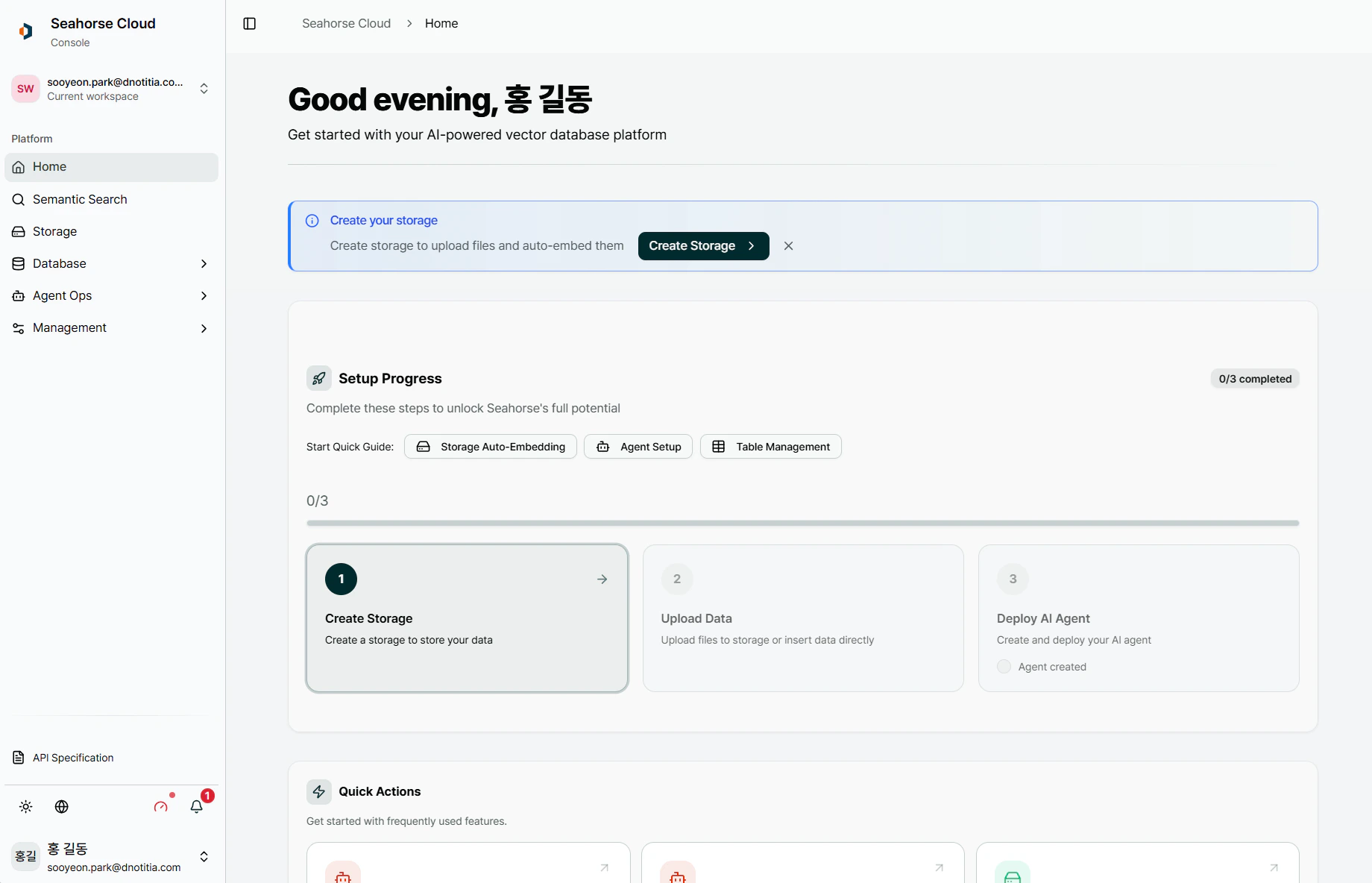
> 콘솔 기본 화면 구성 — 좌측 사이드바(네비게이션·테넌트·알림·설정·계정) + 우측 콘텐츠 영역의 2 영역 레이아웃
# 기본 화면 구성
Seahorse Cloud 콘솔은 **좌측 사이드바 + 우측 콘텐츠** 의 2 영역 레이아웃입니다. 좌측 사이드바 안에 다시 테넌트 드롭다운 · 네비게이션 메뉴 · 유틸리티(알림·API 문서·테마·언어) · 계정 영역이 수직으로 쌓여 있고, 우측은 선택한 메뉴의 실제 화면이 렌더됩니다.
 ## 구성 요소
| # | 영역 | 위치 | 페이지 |
| - | ------------------------ | -------------------- | -------------------------------------------------------------------------------------------------------------------- |
| ① | **테넌트 드롭다운** | 사이드바 최상단 | [Main Layout — 테넌트](/console/home/ui/main-layout#테넌트-드롭다운-최상단) |
| ② | **Navigation (메뉴 트리)** | Platform / System 그룹 | [좌측 네비게이션](/console/home/ui/navigation) |
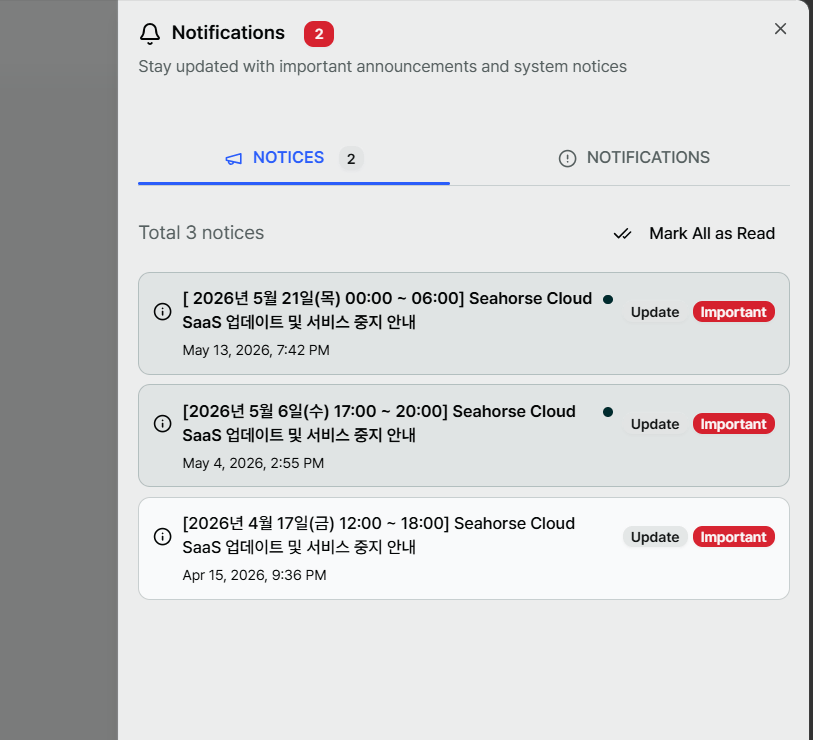
| ③ | **유틸리티 + Notifications** | 사이드바 하단 | [Main Layout — 유틸리티](/console/home/ui/main-layout#하단-유틸리티) / [Notifications 팝업](/console/home/ui/notification-popup) |
| ④ | **계정 영역** | 사이드바 최하단 | [Account Console](/auth/account) |
| ⑤ | **콘텐츠 영역** | 우측 전체 | [중앙 콘텐츠 영역](/console/home/ui/content-area) |
## 어디서 뭘 할까?
| 작업 | 시작 위치 |
| --------------- | --------------------------------------- |
| 기능 화면 이동 | ② Navigation |
| 테넌트 전환 | ① 테넌트 드롭다운 |
| 공지·개인 알림 확인 | ③ 🔔 Notifications |
| API 레퍼런스 · 고객지원 | ③ 📘 / ❔ |
| 라이트/다크 · 언어 전환 | ③ 🌓 / 🌐 |
| 비밀번호·세션 관리 | ④ 계정 → [Account Console](/auth/account) |
**리소스가 안 보이면 테넌트부터 확인.** 모든 리소스는 ① 테넌트 단위로 격리됩니다. 소속 테넌트가 여러 개면 상단 드롭다운에서 전환하세요.
기능별 상세는 [Home & Quick Started 화면](/console/home/main) 또는 좌측 네비게이션 각 메뉴 문서를 참고하세요.
## 페이지
중앙 컨텐츠 영역은 다음 구성 요소로 이루어져 있습니다
Main Layout — Seahorse Cloud 콘솔의 2 영역 레이아웃 (좌측 사이드바 + 우측 콘텐츠). 사이드바 내부의 테넌트·알림·설정·계정 영역 안내
Seahorse Cloud 좌측 네비게이션 — 기능별 메뉴 트리 (Home / Semantic Search / Storage / Database / Agent Ops / Management)
Notifications 팝업 — NOTICES(공지사항) / NOTIFICATIONS(개인 알림) 두 개의 탭으로 운영 공지와 개인 알림을 분리 표시
## 관련 문서
* [Home](/)
## 구성 요소
| # | 영역 | 위치 | 페이지 |
| - | ------------------------ | -------------------- | -------------------------------------------------------------------------------------------------------------------- |
| ① | **테넌트 드롭다운** | 사이드바 최상단 | [Main Layout — 테넌트](/console/home/ui/main-layout#테넌트-드롭다운-최상단) |
| ② | **Navigation (메뉴 트리)** | Platform / System 그룹 | [좌측 네비게이션](/console/home/ui/navigation) |
| ③ | **유틸리티 + Notifications** | 사이드바 하단 | [Main Layout — 유틸리티](/console/home/ui/main-layout#하단-유틸리티) / [Notifications 팝업](/console/home/ui/notification-popup) |
| ④ | **계정 영역** | 사이드바 최하단 | [Account Console](/auth/account) |
| ⑤ | **콘텐츠 영역** | 우측 전체 | [중앙 콘텐츠 영역](/console/home/ui/content-area) |
## 어디서 뭘 할까?
| 작업 | 시작 위치 |
| --------------- | --------------------------------------- |
| 기능 화면 이동 | ② Navigation |
| 테넌트 전환 | ① 테넌트 드롭다운 |
| 공지·개인 알림 확인 | ③ 🔔 Notifications |
| API 레퍼런스 · 고객지원 | ③ 📘 / ❔ |
| 라이트/다크 · 언어 전환 | ③ 🌓 / 🌐 |
| 비밀번호·세션 관리 | ④ 계정 → [Account Console](/auth/account) |
**리소스가 안 보이면 테넌트부터 확인.** 모든 리소스는 ① 테넌트 단위로 격리됩니다. 소속 테넌트가 여러 개면 상단 드롭다운에서 전환하세요.
기능별 상세는 [Home & Quick Started 화면](/console/home/main) 또는 좌측 네비게이션 각 메뉴 문서를 참고하세요.
## 페이지
중앙 컨텐츠 영역은 다음 구성 요소로 이루어져 있습니다
Main Layout — Seahorse Cloud 콘솔의 2 영역 레이아웃 (좌측 사이드바 + 우측 콘텐츠). 사이드바 내부의 테넌트·알림·설정·계정 영역 안내
Seahorse Cloud 좌측 네비게이션 — 기능별 메뉴 트리 (Home / Semantic Search / Storage / Database / Agent Ops / Management)
Notifications 팝업 — NOTICES(공지사항) / NOTIFICATIONS(개인 알림) 두 개의 탭으로 운영 공지와 개인 알림을 분리 표시
## 관련 문서
* [Home](/)