> ## Documentation Index
> Fetch the complete documentation index at: https://manual.seahorse.dnotitia.ai/llms.txt
> Use this file to discover all available pages before exploring further.
> System Prompt 목록 — 등록된 프롬프트의 이름·설명·Activation Mode·생성일을 조회하고 관리
# Prompt list
# System Prompt 목록
**경로**: Console → **Agent Ops** → **System Prompts**
`Manage System Prompts for the Agent.`
등록된 시스템 프롬프트 전체 목록을 조회하고, 개별 프롬프트의 활성 모드를 확인합니다.
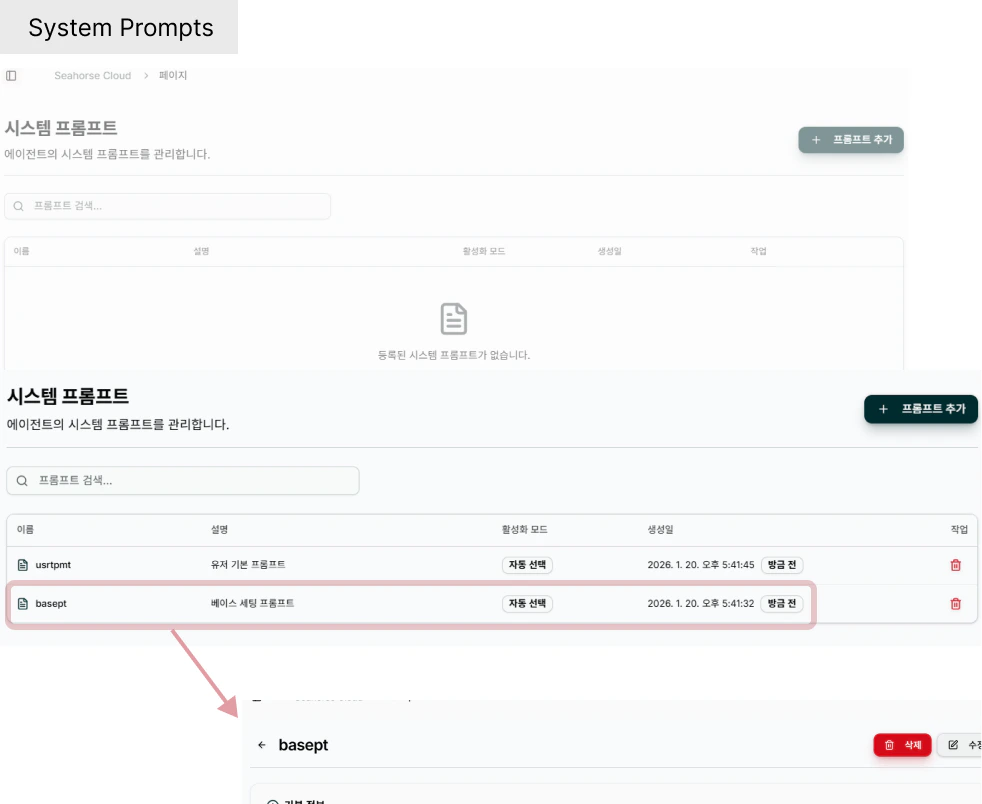 ## 헤더
| 요소 | 설명 |
| -------------------------------------- | -------------------------------------------------------------------------------- |
| **System Prompt** (타이틀) | 페이지 제목 |
| `Manage System Prompts for the Agent.` | 부제 |
| **Create Prompt** (우측 상단) | 신규 프롬프트 생성 → [System Prompt 생성](/console/agent-ops/system-prompts/prompt-create) |
| **Search prompts…** | 이름·설명 실시간 필터 |
## 목록 컬럼
| 컬럼 | 설명 | 예시 |
| ------------------- | -------------------------------------------------------------------- | ------------------------------------- |
| **Name** | 프롬프트 이름 (클릭 시 [상세](/console/agent-ops/system-prompts/prompt-detail)) | `dd` |
| **Description** | 프롬프트 설명 | `dd` |
| **Activation Mode** | 활성화 방식 — `Auto Select` / `Manual` 등 | `Auto Select` |
| **Created At** | 생성 일시 (절대 + 상대 시간 뱃지) | `2026. 4. 21. 오후 8:21:09` · `17h ago` |
| **Actions** | ✏ 편집 · 🗑 삭제 | — |
### Activation Mode 값
| 값 | 의미 |
| --------------- | ------------------------------------------------------- |
| **Auto Select** | 에이전트가 런타임 상황에 맞는 프롬프트를 **자동 선택** — 여러 역할을 한 에이전트로 운영할 때 |
| **Manual** | 에이전트 설정에서 명시적으로 연결한 경우에만 사용 |
## 동작
* **Name 클릭** → [System Prompt 상세](/console/agent-ops/system-prompts/prompt-detail)
* **✏ Edit** → [System Prompt 수정](/console/agent-ops/system-prompts/prompt-update)
* **🗑 Delete** → [System Prompt 삭제](/console/agent-ops/system-prompts/prompt-delete) 확인 다이얼로그
* **Create Prompt** → [System Prompt 생성](/console/agent-ops/system-prompts/prompt-create)
프롬프트와 에이전트 연결은 [Agent 상세 → System Prompts 팝업](/console/agent-ops/agent/agent-settings#system-prompts-시스템-프롬프트-연결) 에서 다중 선택으로 수행합니다. 본 화면은 **프롬프트 자체의 생성·관리** 에 집중.
## 관련 문서
* [System Prompt 생성](/console/agent-ops/system-prompts/prompt-create)
* [System Prompt 상세](/console/agent-ops/system-prompts/prompt-detail)
* [System Prompt 수정](/console/agent-ops/system-prompts/prompt-update)
* [System Prompt 삭제](/console/agent-ops/system-prompts/prompt-delete)
* [Agent 설정 → System Prompts 연결](/console/agent-ops/agent/agent-settings#system-prompts-시스템-프롬프트-연결)
## 헤더
| 요소 | 설명 |
| -------------------------------------- | -------------------------------------------------------------------------------- |
| **System Prompt** (타이틀) | 페이지 제목 |
| `Manage System Prompts for the Agent.` | 부제 |
| **Create Prompt** (우측 상단) | 신규 프롬프트 생성 → [System Prompt 생성](/console/agent-ops/system-prompts/prompt-create) |
| **Search prompts…** | 이름·설명 실시간 필터 |
## 목록 컬럼
| 컬럼 | 설명 | 예시 |
| ------------------- | -------------------------------------------------------------------- | ------------------------------------- |
| **Name** | 프롬프트 이름 (클릭 시 [상세](/console/agent-ops/system-prompts/prompt-detail)) | `dd` |
| **Description** | 프롬프트 설명 | `dd` |
| **Activation Mode** | 활성화 방식 — `Auto Select` / `Manual` 등 | `Auto Select` |
| **Created At** | 생성 일시 (절대 + 상대 시간 뱃지) | `2026. 4. 21. 오후 8:21:09` · `17h ago` |
| **Actions** | ✏ 편집 · 🗑 삭제 | — |
### Activation Mode 값
| 값 | 의미 |
| --------------- | ------------------------------------------------------- |
| **Auto Select** | 에이전트가 런타임 상황에 맞는 프롬프트를 **자동 선택** — 여러 역할을 한 에이전트로 운영할 때 |
| **Manual** | 에이전트 설정에서 명시적으로 연결한 경우에만 사용 |
## 동작
* **Name 클릭** → [System Prompt 상세](/console/agent-ops/system-prompts/prompt-detail)
* **✏ Edit** → [System Prompt 수정](/console/agent-ops/system-prompts/prompt-update)
* **🗑 Delete** → [System Prompt 삭제](/console/agent-ops/system-prompts/prompt-delete) 확인 다이얼로그
* **Create Prompt** → [System Prompt 생성](/console/agent-ops/system-prompts/prompt-create)
프롬프트와 에이전트 연결은 [Agent 상세 → System Prompts 팝업](/console/agent-ops/agent/agent-settings#system-prompts-시스템-프롬프트-연결) 에서 다중 선택으로 수행합니다. 본 화면은 **프롬프트 자체의 생성·관리** 에 집중.
## 관련 문서
* [System Prompt 생성](/console/agent-ops/system-prompts/prompt-create)
* [System Prompt 상세](/console/agent-ops/system-prompts/prompt-detail)
* [System Prompt 수정](/console/agent-ops/system-prompts/prompt-update)
* [System Prompt 삭제](/console/agent-ops/system-prompts/prompt-delete)
* [Agent 설정 → System Prompts 연결](/console/agent-ops/agent/agent-settings#system-prompts-시스템-프롬프트-연결)