> ## Documentation Index
> Fetch the complete documentation index at: https://manual.seahorse.dnotitia.ai/llms.txt
> Use this file to discover all available pages before exploring further.
> Agent 상세 — Properties 상단 요약 + 6 개 탭(Users / Endpoints / Tables / Tools / Slack / Rules) 로 연결 리소스 확인
# Agent detail
# Agent 상세
**경로**: Console → **Agent Ops** → **Agent** → 목록에서 에이전트 이름 클릭
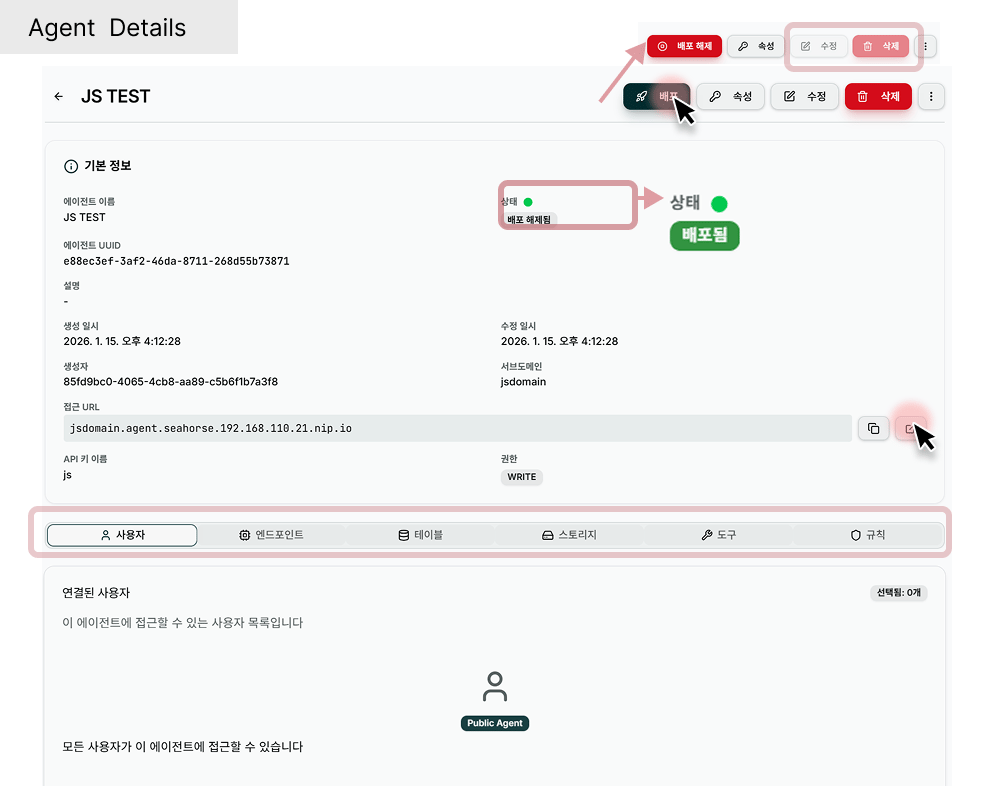 ## 헤더
| 요소 | 설명 |
| -------------------------------- | -------------------------------------------------------------------------------------------------------------------- |
| **← Toggle Sidebar** | 좌측 네비게이션 접기/펼치기 |
| **Breadcrumb** | `Seahorse Cloud > Agent Ops > Agents > {이름}` |
| **제목 (에이전트 이름)** | 예: `js` |
| **Export Conversations** (우측 상단) | 이 에이전트의 대화 이력 내보내기 → [Export Conversations](/console/agent-ops/agent/agent-settings#export-conversations-대화-이력-내보내기) |
| **Edit** (우측 상단) | 에이전트 수정 → [Agent 수정](/console/agent-ops/agent/agent-update) |
| **Delete** (우측 상단, 빨강) | 에이전트 삭제 → [Agent 삭제](/console/agent-ops/agent/agent-delete) |
## Properties — Basic Information
상단 **Properties** 섹션에 에이전트 핵심 속성이 요약됩니다.
| 항목 | 설명 | 예시 |
| ---------------------- | ------------ | --------------------------------------------------------------------- |
| **Name** | 에이전트 이름 | `js` |
| **Agent ID (UUID)** | 내부 고유 식별자 | `f104a429-32e5-4e44-ada1-091718cb6c50` |
| **Description** | 설명 (없으면 `-`) | — |
| **Status** | 배포 상태 | `Ready` |
| **API Key Permission** | 발급된 키 권한 | `READ` / `WRITE` |
| **Owner** | 생성자 이메일 | `admin@dnotitia.com` |
| **Created At** | 생성 시각 | `2026. 4. 17. 오후 4:45:53` |
| **Updated At** | 마지막 수정 시각 | `2026. 4. 17. 오후 4:48:45` |
| **Agent URL** | 배포된 서비스 주소 | `https://f104a42932e54e44ada1091718cb6c50.agent.seahorse.dnotitia.ai` |
**Agent URL** 은 에이전트 **UUID 에서 하이픈을 제거한 서브도메인** 으로 구성됩니다. 생성 시 **Subdomain** 을 지정하면 사용자 지정 URL (`{subdomain}.agent.seahorse.dnotitia.ai`) 로 접근할 수 있습니다.
## 탭 구성
상세 화면은 **6 개 탭** 으로 연결 리소스를 보여줍니다. 모든 탭은 **읽기 전용** 이며, 변경은 우측 상단 **Edit** 버튼으로 [Agent 수정](/console/agent-ops/agent/agent-update) 화면에서 수행합니다.
| 탭 | 내용 |
| --------------------------- | -------------------------------- |
| **Users** 👤 | Access Control · Connected Users |
| **Endpoints** ⚡ | 연결된 Inference Endpoint 목록 |
| **Tables** ▦ | 검색 대상 Table 목록 |
| **Tools** 🧰 | 연결된 MCP/Built-in 도구 |
| **Slack** 💬 | Slack 리스너 설정 상태 |
| **Rules** 🛡 *(On-prem 전용)* | 응답 규칙 — Cloud 비활성 |
### Users 탭
**Connected Users** 섹션에 접근 제어 설정이 표시됩니다.
| 요소 | 표시 |
| -------------- | ------------------------------------------------------------------------------ |
| **선택 뱃지** | `None selected` · `N selected` |
| 설명 | `Users who have access to this agent` |
| **접근 모드** | `All Authenticated Users` — `Any user who is logged in can access this agent.` |
| 선택된 사용자 목록 | 개별 이메일 (OWNER/MEMBER 뱃지) |
| External Users | 외부 이메일 목록 (있는 경우) |
### Endpoints 탭
연결된 Inference Endpoint 목록을 카드·표로 표시 — 이름·모델·UUID·ACTIVE 상태 등.
### Tables 탭
에이전트가 검색할 벡터 Table 목록. 각 Table 이름·UUID·스토리지 상태(`success` 등) 확인.
### Tools 탭
연결된 MCP 도구·Built-in 도구. 비어 있으면 `No tools available`.
### Slack 탭
**Slack Configuration** — `Slack integration configuration for this agent. Edit the agent to update tokens.`
| 항목 | 미설정 시 표시 | 설정 시 표시 |
| ------------------------ | ---------------------- | ----------------- |
| **Slack Bot Token** | `Not Configured` | `xoxb-…` (마스킹) |
| **Slack App Token** | `Not Configured` | `xapp-…` (마스킹) |
| **Slack Signing Secret** | `Not Configured` | `••••` (마스킹) |
| **Selected Tools** | `-` | `slack, github` 등 |
| **Default LLM** | `-` | 선택한 엔드포인트 이름 |
| **Response in Thread** | `Enabled` / `Disabled` | — |
Slack 상세 화면에서는 **토큰 값을 직접 볼 수 없습니다.** 토큰 교체 시 Edit 로 이동해 새 값을 입력하세요. 설정 순서는 [Slack 으로 문서 받아보기](/agent-chat/recipes/slack-document-delivery) 레시피 참고.
### Rules 탭 *(On-prem 전용)*
Cloud 환경에서는 비활성. On-prem 도입 시 별도 상담.
## 자주 쓰는 동작
* **에이전트 사용해보기** → 헤더의 **Agent URL** 복사 → 브라우저 탭에서 열기
* **설정 변경** → 우측 상단 **Edit** → [Agent 수정](/console/agent-ops/agent/agent-update)
* **에이전트 제거** → 우측 상단 **Delete** → [Agent 삭제](/console/agent-ops/agent/agent-delete)
**배포(Ready) 상태의 에이전트를 Delete** 하면 Agent URL 이 즉시 404 가 됩니다. 외부 서비스·Slack 봇·Slack Canvas 링크에 URL 이 박혀 있다면 먼저 교체하세요.
## 관련 문서
* [Agent 목록](/console/agent-ops/agent/agent-list)
* [Agent 수정](/console/agent-ops/agent/agent-update)
* [Agent 삭제](/console/agent-ops/agent/agent-delete)
* [Agent Chat](/agent-chat) — 배포된 에이전트와 채팅
## 헤더
| 요소 | 설명 |
| -------------------------------- | -------------------------------------------------------------------------------------------------------------------- |
| **← Toggle Sidebar** | 좌측 네비게이션 접기/펼치기 |
| **Breadcrumb** | `Seahorse Cloud > Agent Ops > Agents > {이름}` |
| **제목 (에이전트 이름)** | 예: `js` |
| **Export Conversations** (우측 상단) | 이 에이전트의 대화 이력 내보내기 → [Export Conversations](/console/agent-ops/agent/agent-settings#export-conversations-대화-이력-내보내기) |
| **Edit** (우측 상단) | 에이전트 수정 → [Agent 수정](/console/agent-ops/agent/agent-update) |
| **Delete** (우측 상단, 빨강) | 에이전트 삭제 → [Agent 삭제](/console/agent-ops/agent/agent-delete) |
## Properties — Basic Information
상단 **Properties** 섹션에 에이전트 핵심 속성이 요약됩니다.
| 항목 | 설명 | 예시 |
| ---------------------- | ------------ | --------------------------------------------------------------------- |
| **Name** | 에이전트 이름 | `js` |
| **Agent ID (UUID)** | 내부 고유 식별자 | `f104a429-32e5-4e44-ada1-091718cb6c50` |
| **Description** | 설명 (없으면 `-`) | — |
| **Status** | 배포 상태 | `Ready` |
| **API Key Permission** | 발급된 키 권한 | `READ` / `WRITE` |
| **Owner** | 생성자 이메일 | `admin@dnotitia.com` |
| **Created At** | 생성 시각 | `2026. 4. 17. 오후 4:45:53` |
| **Updated At** | 마지막 수정 시각 | `2026. 4. 17. 오후 4:48:45` |
| **Agent URL** | 배포된 서비스 주소 | `https://f104a42932e54e44ada1091718cb6c50.agent.seahorse.dnotitia.ai` |
**Agent URL** 은 에이전트 **UUID 에서 하이픈을 제거한 서브도메인** 으로 구성됩니다. 생성 시 **Subdomain** 을 지정하면 사용자 지정 URL (`{subdomain}.agent.seahorse.dnotitia.ai`) 로 접근할 수 있습니다.
## 탭 구성
상세 화면은 **6 개 탭** 으로 연결 리소스를 보여줍니다. 모든 탭은 **읽기 전용** 이며, 변경은 우측 상단 **Edit** 버튼으로 [Agent 수정](/console/agent-ops/agent/agent-update) 화면에서 수행합니다.
| 탭 | 내용 |
| --------------------------- | -------------------------------- |
| **Users** 👤 | Access Control · Connected Users |
| **Endpoints** ⚡ | 연결된 Inference Endpoint 목록 |
| **Tables** ▦ | 검색 대상 Table 목록 |
| **Tools** 🧰 | 연결된 MCP/Built-in 도구 |
| **Slack** 💬 | Slack 리스너 설정 상태 |
| **Rules** 🛡 *(On-prem 전용)* | 응답 규칙 — Cloud 비활성 |
### Users 탭
**Connected Users** 섹션에 접근 제어 설정이 표시됩니다.
| 요소 | 표시 |
| -------------- | ------------------------------------------------------------------------------ |
| **선택 뱃지** | `None selected` · `N selected` |
| 설명 | `Users who have access to this agent` |
| **접근 모드** | `All Authenticated Users` — `Any user who is logged in can access this agent.` |
| 선택된 사용자 목록 | 개별 이메일 (OWNER/MEMBER 뱃지) |
| External Users | 외부 이메일 목록 (있는 경우) |
### Endpoints 탭
연결된 Inference Endpoint 목록을 카드·표로 표시 — 이름·모델·UUID·ACTIVE 상태 등.
### Tables 탭
에이전트가 검색할 벡터 Table 목록. 각 Table 이름·UUID·스토리지 상태(`success` 등) 확인.
### Tools 탭
연결된 MCP 도구·Built-in 도구. 비어 있으면 `No tools available`.
### Slack 탭
**Slack Configuration** — `Slack integration configuration for this agent. Edit the agent to update tokens.`
| 항목 | 미설정 시 표시 | 설정 시 표시 |
| ------------------------ | ---------------------- | ----------------- |
| **Slack Bot Token** | `Not Configured` | `xoxb-…` (마스킹) |
| **Slack App Token** | `Not Configured` | `xapp-…` (마스킹) |
| **Slack Signing Secret** | `Not Configured` | `••••` (마스킹) |
| **Selected Tools** | `-` | `slack, github` 등 |
| **Default LLM** | `-` | 선택한 엔드포인트 이름 |
| **Response in Thread** | `Enabled` / `Disabled` | — |
Slack 상세 화면에서는 **토큰 값을 직접 볼 수 없습니다.** 토큰 교체 시 Edit 로 이동해 새 값을 입력하세요. 설정 순서는 [Slack 으로 문서 받아보기](/agent-chat/recipes/slack-document-delivery) 레시피 참고.
### Rules 탭 *(On-prem 전용)*
Cloud 환경에서는 비활성. On-prem 도입 시 별도 상담.
## 자주 쓰는 동작
* **에이전트 사용해보기** → 헤더의 **Agent URL** 복사 → 브라우저 탭에서 열기
* **설정 변경** → 우측 상단 **Edit** → [Agent 수정](/console/agent-ops/agent/agent-update)
* **에이전트 제거** → 우측 상단 **Delete** → [Agent 삭제](/console/agent-ops/agent/agent-delete)
**배포(Ready) 상태의 에이전트를 Delete** 하면 Agent URL 이 즉시 404 가 됩니다. 외부 서비스·Slack 봇·Slack Canvas 링크에 URL 이 박혀 있다면 먼저 교체하세요.
## 관련 문서
* [Agent 목록](/console/agent-ops/agent/agent-list)
* [Agent 수정](/console/agent-ops/agent/agent-update)
* [Agent 삭제](/console/agent-ops/agent/agent-delete)
* [Agent Chat](/agent-chat) — 배포된 에이전트와 채팅