> ## Documentation Index
> Fetch the complete documentation index at: https://manual.seahorse.dnotitia.ai/llms.txt
> Use this file to discover all available pages before exploring further.
> Word — DOCX 템플릿 업로드 + 8 개 도구로 문서 생성·편집·재렌더. Templates / Generated Files 2 영역
# Word
# Word
**경로**: 하단 툴바 **Word**
업로드된 **DOCX 템플릿** 에 데이터를 주입해 문서를 자동 생성합니다. 생성 후 **소스(JSON spec) 편집 → 재렌더** 방식으로 세밀한 수정을 지원.
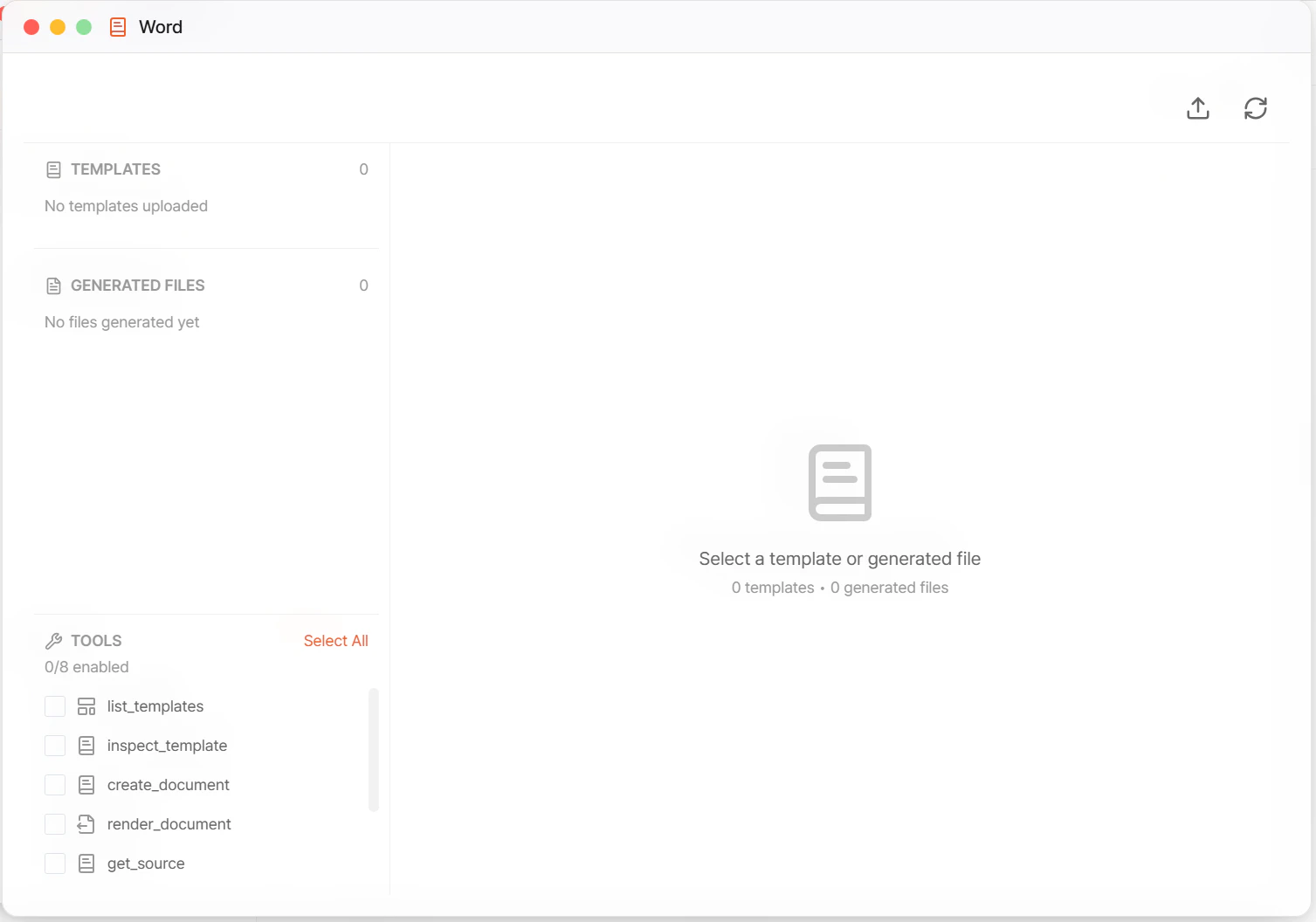 ## UI 구성
| 영역 | 설명 |
| ---------------------- | ----------------------------------------------- |
| **Templates** 섹션 | 업로드된 DOCX 템플릿 — 개수 뱃지 |
| **Generated Files** 섹션 | 생성된 DOCX 결과물 — 개수 뱃지 |
| **Tools** 체크리스트 | 활성화할 도구 선택 (`N/8 enabled`) |
| 상태 라인 | `0 templates • 0 generated files` 요약 |
| 우측 패널 | `Select a template or generated file` — 선택 시 상세 |
## Templates 섹션
`No templates uploaded` 빈 상태 → 업로드 필요.
* 업로드 위치: [Temp Files](/agent-chat/toolbar/temp-files) 의 `docx_templates/` 폴더
* 템플릿 작성법: [Word 템플릿 가이드](/agent-chat/toolbar/word/template-guide)
## Generated Files 섹션
`No files generated yet` 빈 상태 → 생성된 문서는 [Temp Files → generated\_docxs](/agent-chat/toolbar/temp-files) 에 자동 저장되고 여기 목록에 반영됩니다.
## Tools — 8 개 도구
`Select All` 또는 개별 체크로 활성화 (`N/8 enabled`).
| 도구 | 용도 |
| ---------------------- | ------------------------------- |
| **list\_templates** | 등록된 DOCX 템플릿 목록 |
| **inspect\_template** | 템플릿 placeholder·구조 분석 |
| **create\_document** | 템플릿 기반 새 문서 생성 |
| **render\_document** | JSON spec → DOCX 렌더 |
| **get\_source** | 생성된 문서의 내부 **소스(JSON spec)** 조회 |
| **edit\_source** | 소스 JSON 직접 편집 — 구조적 수정 |
| **edit\_document** | 문서 콘텐츠 편집 — 자연어 기반 수정 |
| **rerender\_document** | 소스 수정 후 재렌더해 최신 DOCX 생성 |
## 편집 흐름 두 가지
Word 도구는 **소스 편집** 과 **문서 편집** 두 가지 경로를 제공합니다.
| 경로 | 도구 조합 | 언제 쓰나 |
| --------- | -------------------------------------------------- | ---------------------------------------- |
| **소스 기반** | `get_source` → `edit_source` → `rerender_document` | 구조 변경(섹션 추가·순서 변경·반복 블록 수정) 등 **구조적** 편집 |
| **문서 기반** | `edit_document` | `3번째 단락을 고쳐줘` 같은 **자연어 기반** 간단한 수정 |
복잡한 대량 편집은 **소스 기반** 이 재현성·일관성에서 우수합니다. 문서 기반은 일회성 수정·빠른 교정용.
## 기본 작업 흐름
`docx_templates/` 에 DOCX 템플릿 드롭. 변수 태그는 `{{변수명}}` 또는 Jinja2 스타일. 자세한 문법: [Word 템플릿 가이드](/agent-chat/toolbar/word/template-guide).
`list_templates` → `inspect_template` 로 변수·섹션·표 구조 파악.
`create_document(template, data)` 로 신규 DOCX 생성. Generated Files 에 파일 출현.
필요 시 `get_source` → `edit_source` → `rerender_document` 사이클 또는 `edit_document` 로 수정.
Temp Files 에서 다운로드하거나 [Storage](/agent-chat/toolbar/storage) 로 이관해 영구 보관.
## 활용 시나리오
| 시나리오 | 구성 |
| ------------------- | -------------------------------------------------------------- |
| **영업 제안서 자동 생성** | [레시피 — 템플릿 기반 제안서](/agent-chat/recipes/proposal-from-template) |
| **주간 보고서 배치** | [레시피 — 보고서 자동 발행](/agent-chat/recipes/scheduled-report) |
| **계약서 초안** | 법무 승인된 템플릿 + 거래 조건 DB → DOCX 초안 |
| **채용 Offer Letter** | HR DB 단가 + 회사 소개 템플릿 → 후보자별 DOCX |
| **번역본 생성** | 같은 소스 → `edit_source` 로 언어만 변경 → 다국어 DOCX |
## 운영 주의
* **할루시네이션 주의** — 계약 금액·법적 문구 같은 수치·문장은 반드시 DB·카탈로그 출처 강제. 에이전트가 추정 금지.
* **법적 문구·계약서** 는 자동 생성 후 반드시 **법무 검토**. 자동 결재·전자서명 연결 금지.
* **템플릿 품질** = 결과물 품질. 서식·스타일·단락 정렬이 템플릿 단계에서 정리되어 있어야 합니다. [템플릿 가이드](/agent-chat/toolbar/word/template-guide) 준수.
* **소스 편집 시 JSON 스키마 깨짐 주의** — `edit_source` 결과가 `rerender_document` 에서 실패하면 원본 소스 복구.
* **비용** — 대량 생성 시 LLM 호출 × 문서 수로 비용 증가. 한도·요금: [Billing](/billing)
## 관련 문서
* [Word 템플릿 작성 가이드](/agent-chat/toolbar/word/template-guide)
* [Temp Files](/agent-chat/toolbar/temp-files) — `docx_templates/` · `generated_docxs/` 위치
* [PowerPoint](/agent-chat/toolbar/powerpoint) — 자매 기능 (PPTX 생성)
* [템플릿 기반 제안서 레시피](/agent-chat/recipes/proposal-from-template)
* [보고서 자동 발행 레시피](/agent-chat/recipes/scheduled-report)
## UI 구성
| 영역 | 설명 |
| ---------------------- | ----------------------------------------------- |
| **Templates** 섹션 | 업로드된 DOCX 템플릿 — 개수 뱃지 |
| **Generated Files** 섹션 | 생성된 DOCX 결과물 — 개수 뱃지 |
| **Tools** 체크리스트 | 활성화할 도구 선택 (`N/8 enabled`) |
| 상태 라인 | `0 templates • 0 generated files` 요약 |
| 우측 패널 | `Select a template or generated file` — 선택 시 상세 |
## Templates 섹션
`No templates uploaded` 빈 상태 → 업로드 필요.
* 업로드 위치: [Temp Files](/agent-chat/toolbar/temp-files) 의 `docx_templates/` 폴더
* 템플릿 작성법: [Word 템플릿 가이드](/agent-chat/toolbar/word/template-guide)
## Generated Files 섹션
`No files generated yet` 빈 상태 → 생성된 문서는 [Temp Files → generated\_docxs](/agent-chat/toolbar/temp-files) 에 자동 저장되고 여기 목록에 반영됩니다.
## Tools — 8 개 도구
`Select All` 또는 개별 체크로 활성화 (`N/8 enabled`).
| 도구 | 용도 |
| ---------------------- | ------------------------------- |
| **list\_templates** | 등록된 DOCX 템플릿 목록 |
| **inspect\_template** | 템플릿 placeholder·구조 분석 |
| **create\_document** | 템플릿 기반 새 문서 생성 |
| **render\_document** | JSON spec → DOCX 렌더 |
| **get\_source** | 생성된 문서의 내부 **소스(JSON spec)** 조회 |
| **edit\_source** | 소스 JSON 직접 편집 — 구조적 수정 |
| **edit\_document** | 문서 콘텐츠 편집 — 자연어 기반 수정 |
| **rerender\_document** | 소스 수정 후 재렌더해 최신 DOCX 생성 |
## 편집 흐름 두 가지
Word 도구는 **소스 편집** 과 **문서 편집** 두 가지 경로를 제공합니다.
| 경로 | 도구 조합 | 언제 쓰나 |
| --------- | -------------------------------------------------- | ---------------------------------------- |
| **소스 기반** | `get_source` → `edit_source` → `rerender_document` | 구조 변경(섹션 추가·순서 변경·반복 블록 수정) 등 **구조적** 편집 |
| **문서 기반** | `edit_document` | `3번째 단락을 고쳐줘` 같은 **자연어 기반** 간단한 수정 |
복잡한 대량 편집은 **소스 기반** 이 재현성·일관성에서 우수합니다. 문서 기반은 일회성 수정·빠른 교정용.
## 기본 작업 흐름
`docx_templates/` 에 DOCX 템플릿 드롭. 변수 태그는 `{{변수명}}` 또는 Jinja2 스타일. 자세한 문법: [Word 템플릿 가이드](/agent-chat/toolbar/word/template-guide).
`list_templates` → `inspect_template` 로 변수·섹션·표 구조 파악.
`create_document(template, data)` 로 신규 DOCX 생성. Generated Files 에 파일 출현.
필요 시 `get_source` → `edit_source` → `rerender_document` 사이클 또는 `edit_document` 로 수정.
Temp Files 에서 다운로드하거나 [Storage](/agent-chat/toolbar/storage) 로 이관해 영구 보관.
## 활용 시나리오
| 시나리오 | 구성 |
| ------------------- | -------------------------------------------------------------- |
| **영업 제안서 자동 생성** | [레시피 — 템플릿 기반 제안서](/agent-chat/recipes/proposal-from-template) |
| **주간 보고서 배치** | [레시피 — 보고서 자동 발행](/agent-chat/recipes/scheduled-report) |
| **계약서 초안** | 법무 승인된 템플릿 + 거래 조건 DB → DOCX 초안 |
| **채용 Offer Letter** | HR DB 단가 + 회사 소개 템플릿 → 후보자별 DOCX |
| **번역본 생성** | 같은 소스 → `edit_source` 로 언어만 변경 → 다국어 DOCX |
## 운영 주의
* **할루시네이션 주의** — 계약 금액·법적 문구 같은 수치·문장은 반드시 DB·카탈로그 출처 강제. 에이전트가 추정 금지.
* **법적 문구·계약서** 는 자동 생성 후 반드시 **법무 검토**. 자동 결재·전자서명 연결 금지.
* **템플릿 품질** = 결과물 품질. 서식·스타일·단락 정렬이 템플릿 단계에서 정리되어 있어야 합니다. [템플릿 가이드](/agent-chat/toolbar/word/template-guide) 준수.
* **소스 편집 시 JSON 스키마 깨짐 주의** — `edit_source` 결과가 `rerender_document` 에서 실패하면 원본 소스 복구.
* **비용** — 대량 생성 시 LLM 호출 × 문서 수로 비용 증가. 한도·요금: [Billing](/billing)
## 관련 문서
* [Word 템플릿 작성 가이드](/agent-chat/toolbar/word/template-guide)
* [Temp Files](/agent-chat/toolbar/temp-files) — `docx_templates/` · `generated_docxs/` 위치
* [PowerPoint](/agent-chat/toolbar/powerpoint) — 자매 기능 (PPTX 생성)
* [템플릿 기반 제안서 레시피](/agent-chat/recipes/proposal-from-template)
* [보고서 자동 발행 레시피](/agent-chat/recipes/scheduled-report)