> ## Documentation Index
> Fetch the complete documentation index at: https://manual.seahorse.dnotitia.ai/llms.txt
> Use this file to discover all available pages before exploring further.
> PowerPoint — PPTX 템플릿 업로드 + 8 개 도구로 슬라이드 생성·편집·스크린샷·리뷰. Templates / Generated Files 2 영역
# Powerpoint
# PowerPoint
**경로**: 하단 툴바 **PowerPoint**
업로드된 **PPTX 템플릿** 에 데이터를 주입해 프레젠테이션을 자동 생성합니다. 슬라이드 단위 편집·스크린샷·리뷰까지 한 패널에서 처리.
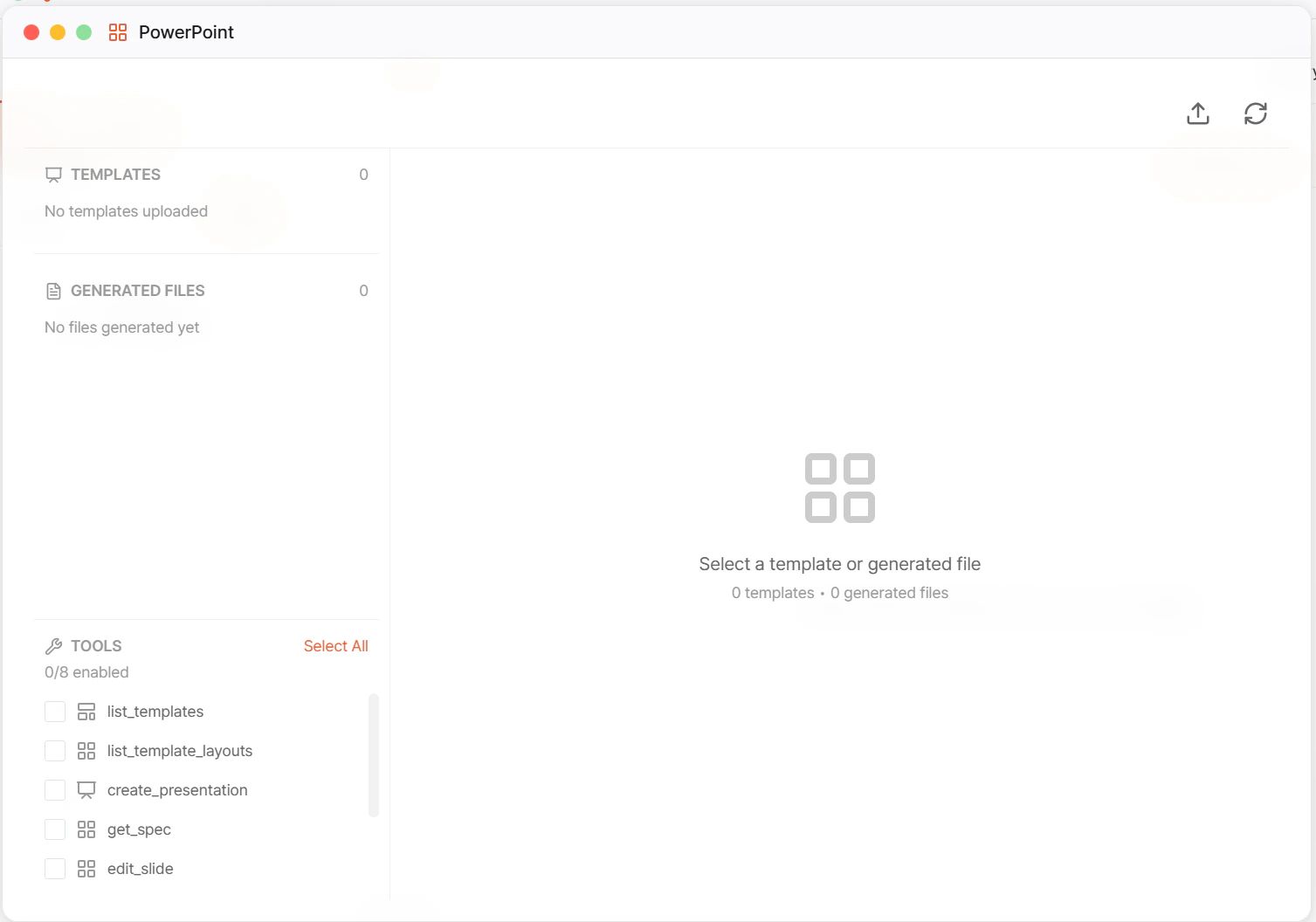 ## UI 구성
| 영역 | 설명 |
| ---------------------- | -------------------------------------------------- |
| **Templates** 섹션 | 업로드된 PPTX 템플릿 — 개수 뱃지 표시 |
| **Generated Files** 섹션 | 생성된 PPTX 결과물 — 개수 뱃지 |
| **Tools** 체크리스트 | 활성화할 도구 선택 (`N/8 enabled`) |
| 상태 라인 | `0 templates • 0 generated files` 요약 |
| 우측 패널 | `Select a template or generated file` — 선택 시 상세 표시 |
## Templates 섹션
`No templates uploaded` (빈 상태) → 템플릿 업로드 필요.
* 업로드 위치: [Temp Files](/agent-chat/toolbar/temp-files) 의 `pptx_templates/` 폴더
* PPTX 템플릿 작성법: [PowerPoint 템플릿 가이드](/agent-chat/toolbar/powerpoint/template-guide)
## Generated Files 섹션
`No files generated yet` (빈 상태) → 도구 호출로 파일 생성 시 [Temp Files](/agent-chat/toolbar/temp-files) 의 `generated_pptxs/` 에 자동 저장되고 여기 목록에 반영됩니다.
## Tools — 8 개 도구
`Select All` 또는 개별 체크로 활성화 (`N/8 enabled`).
| 도구 | 용도 |
| ------------------------------ | -------------------------------------------------------------------------------- |
| **list\_templates** | 등록된 PPTX 템플릿 목록 조회 |
| **list\_template\_layouts** | 템플릿 내 Slide Master · Layout 목록 |
| **create\_presentation** | 템플릿 기반 새 프레젠테이션 생성 |
| **get\_spec** | 프레젠테이션 구조(JSON spec) 조회 — 슬라이드·플레이스홀더 위치 |
| **edit\_slide** | 특정 슬라이드 편집 (텍스트·차트 데이터 등) |
| **build\_presentation** | 다수 슬라이드를 한 번에 조립·빌드 |
| **render\_slide\_screenshots** | 슬라이드를 이미지로 렌더 → [Temp Files → pptx\_screenshots](/agent-chat/toolbar/temp-files) |
| **review\_slides** | 생성된 슬라이드를 에이전트가 **자체 리뷰** (가독성·레이아웃·일관성) |
**review\_slides 의 용도**
* 템플릿 + 데이터 주입 후 **슬라이드 스크린샷을 생성** → 멀티모달 LLM 이 본인 출력을 확인 → 잘못된 오버플로·깨진 차트·누락을 찾아 수정 제안.
* 단독으로 돌리기보다 `render_slide_screenshots` → `review_slides` → `edit_slide` 사이클로 자동 개선.
## 기본 작업 흐름
조직 디자인 표준에 맞는 PPTX 를 [Temp Files](/agent-chat/toolbar/temp-files) 의 `pptx_templates/` 에 드롭. 템플릿 작성 규칙: [템플릿 가이드](/agent-chat/toolbar/powerpoint/template-guide).
에이전트가 `list_templates` · `list_template_layouts` 로 템플릿의 Slide Master · Layout · Placeholder 구조 파악.
`create_presentation(template, data)` 로 신규 PPTX 생성. **Generated Files** 섹션과 [Temp Files → generated\_pptxs](/agent-chat/toolbar/temp-files) 에 파일 출현.
`get_spec` 으로 JSON 구조 확인 → `edit_slide` 로 특정 슬라이드의 텍스트·차트 데이터 갱신. 대량 조립이 필요하면 `build_presentation`.
`render_slide_screenshots` → `review_slides` 로 레이아웃 오류·오탈자·데이터 충돌 탐지. 자동 수정 루프 구성 가능.
결과물은 Temp Files 에서 다운로드하거나, [Storage](/agent-chat/toolbar/storage) 로 이관해 영구 보관.
## 활용 시나리오
| 시나리오 | 구성 |
| --------------- | ----------------------------------------------------------------------------------------------------------------------- |
| **임원 주간 보고** | [PostgreSQL 쿼리](/agent-chat/recipes/postgres-sql-automation) → 차트 데이터 → `create_presentation` + `edit_slide` → Slack 전송 |
| **영업 제안서** | [레시피 — 템플릿 기반 제안서](/agent-chat/recipes/proposal-from-template) 참고 |
| **분기 IR 자료** | 고정 템플릿 + 분기별 데이터 치환 → `review_slides` 로 표·차트 정합성 검증 |
| **교육 자료 다수 버전** | 같은 템플릿 + 변수만 바꿔 `build_presentation` 으로 한꺼번에 수십 개 생성 |
## 운영 주의
* **템플릿 퀄리티가 결과 품질 결정** — 플레이스홀더 규격·폰트·슬라이드 마스터 구성이 엉성하면 아무리 좋은 LLM 도 정돈된 결과를 못 만듭니다. [템플릿 가이드](/agent-chat/toolbar/powerpoint/template-guide) 준수.
* **차트 데이터 주입 시 숫자 형식 주의** — 천 단위 구분자·% 기호·날짜 형식이 템플릿 기본값과 다르면 축·눈금이 깨집니다.
* **이미지·차트가 많은 슬라이드** 는 `render_slide_screenshots` 단계가 오래 걸립니다. 꼭 필요할 때만.
* **비용** — `review_slides` 는 멀티모달 LLM 호출이라 일반 텍스트보다 비쌉니다. 한도·요금: [Billing](/billing)
## 관련 문서
* [PowerPoint 템플릿 작성 가이드](/agent-chat/toolbar/powerpoint/template-guide) — Slide Master / Layout / Placeholder 규격
* [Temp Files](/agent-chat/toolbar/temp-files) — `pptx_templates/` · `generated_pptxs/` · `pptx_screenshots/` 위치
* [Word](/agent-chat/toolbar/word) — 자매 기능 (DOCX 생성)
* [템플릿 기반 제안서 생성 레시피](/agent-chat/recipes/proposal-from-template)
* [보고서 자동 발행 레시피](/agent-chat/recipes/scheduled-report)
## UI 구성
| 영역 | 설명 |
| ---------------------- | -------------------------------------------------- |
| **Templates** 섹션 | 업로드된 PPTX 템플릿 — 개수 뱃지 표시 |
| **Generated Files** 섹션 | 생성된 PPTX 결과물 — 개수 뱃지 |
| **Tools** 체크리스트 | 활성화할 도구 선택 (`N/8 enabled`) |
| 상태 라인 | `0 templates • 0 generated files` 요약 |
| 우측 패널 | `Select a template or generated file` — 선택 시 상세 표시 |
## Templates 섹션
`No templates uploaded` (빈 상태) → 템플릿 업로드 필요.
* 업로드 위치: [Temp Files](/agent-chat/toolbar/temp-files) 의 `pptx_templates/` 폴더
* PPTX 템플릿 작성법: [PowerPoint 템플릿 가이드](/agent-chat/toolbar/powerpoint/template-guide)
## Generated Files 섹션
`No files generated yet` (빈 상태) → 도구 호출로 파일 생성 시 [Temp Files](/agent-chat/toolbar/temp-files) 의 `generated_pptxs/` 에 자동 저장되고 여기 목록에 반영됩니다.
## Tools — 8 개 도구
`Select All` 또는 개별 체크로 활성화 (`N/8 enabled`).
| 도구 | 용도 |
| ------------------------------ | -------------------------------------------------------------------------------- |
| **list\_templates** | 등록된 PPTX 템플릿 목록 조회 |
| **list\_template\_layouts** | 템플릿 내 Slide Master · Layout 목록 |
| **create\_presentation** | 템플릿 기반 새 프레젠테이션 생성 |
| **get\_spec** | 프레젠테이션 구조(JSON spec) 조회 — 슬라이드·플레이스홀더 위치 |
| **edit\_slide** | 특정 슬라이드 편집 (텍스트·차트 데이터 등) |
| **build\_presentation** | 다수 슬라이드를 한 번에 조립·빌드 |
| **render\_slide\_screenshots** | 슬라이드를 이미지로 렌더 → [Temp Files → pptx\_screenshots](/agent-chat/toolbar/temp-files) |
| **review\_slides** | 생성된 슬라이드를 에이전트가 **자체 리뷰** (가독성·레이아웃·일관성) |
**review\_slides 의 용도**
* 템플릿 + 데이터 주입 후 **슬라이드 스크린샷을 생성** → 멀티모달 LLM 이 본인 출력을 확인 → 잘못된 오버플로·깨진 차트·누락을 찾아 수정 제안.
* 단독으로 돌리기보다 `render_slide_screenshots` → `review_slides` → `edit_slide` 사이클로 자동 개선.
## 기본 작업 흐름
조직 디자인 표준에 맞는 PPTX 를 [Temp Files](/agent-chat/toolbar/temp-files) 의 `pptx_templates/` 에 드롭. 템플릿 작성 규칙: [템플릿 가이드](/agent-chat/toolbar/powerpoint/template-guide).
에이전트가 `list_templates` · `list_template_layouts` 로 템플릿의 Slide Master · Layout · Placeholder 구조 파악.
`create_presentation(template, data)` 로 신규 PPTX 생성. **Generated Files** 섹션과 [Temp Files → generated\_pptxs](/agent-chat/toolbar/temp-files) 에 파일 출현.
`get_spec` 으로 JSON 구조 확인 → `edit_slide` 로 특정 슬라이드의 텍스트·차트 데이터 갱신. 대량 조립이 필요하면 `build_presentation`.
`render_slide_screenshots` → `review_slides` 로 레이아웃 오류·오탈자·데이터 충돌 탐지. 자동 수정 루프 구성 가능.
결과물은 Temp Files 에서 다운로드하거나, [Storage](/agent-chat/toolbar/storage) 로 이관해 영구 보관.
## 활용 시나리오
| 시나리오 | 구성 |
| --------------- | ----------------------------------------------------------------------------------------------------------------------- |
| **임원 주간 보고** | [PostgreSQL 쿼리](/agent-chat/recipes/postgres-sql-automation) → 차트 데이터 → `create_presentation` + `edit_slide` → Slack 전송 |
| **영업 제안서** | [레시피 — 템플릿 기반 제안서](/agent-chat/recipes/proposal-from-template) 참고 |
| **분기 IR 자료** | 고정 템플릿 + 분기별 데이터 치환 → `review_slides` 로 표·차트 정합성 검증 |
| **교육 자료 다수 버전** | 같은 템플릿 + 변수만 바꿔 `build_presentation` 으로 한꺼번에 수십 개 생성 |
## 운영 주의
* **템플릿 퀄리티가 결과 품질 결정** — 플레이스홀더 규격·폰트·슬라이드 마스터 구성이 엉성하면 아무리 좋은 LLM 도 정돈된 결과를 못 만듭니다. [템플릿 가이드](/agent-chat/toolbar/powerpoint/template-guide) 준수.
* **차트 데이터 주입 시 숫자 형식 주의** — 천 단위 구분자·% 기호·날짜 형식이 템플릿 기본값과 다르면 축·눈금이 깨집니다.
* **이미지·차트가 많은 슬라이드** 는 `render_slide_screenshots` 단계가 오래 걸립니다. 꼭 필요할 때만.
* **비용** — `review_slides` 는 멀티모달 LLM 호출이라 일반 텍스트보다 비쌉니다. 한도·요금: [Billing](/billing)
## 관련 문서
* [PowerPoint 템플릿 작성 가이드](/agent-chat/toolbar/powerpoint/template-guide) — Slide Master / Layout / Placeholder 규격
* [Temp Files](/agent-chat/toolbar/temp-files) — `pptx_templates/` · `generated_pptxs/` · `pptx_screenshots/` 위치
* [Word](/agent-chat/toolbar/word) — 자매 기능 (DOCX 생성)
* [템플릿 기반 제안서 생성 레시피](/agent-chat/recipes/proposal-from-template)
* [보고서 자동 발행 레시피](/agent-chat/recipes/scheduled-report)