> ## Documentation Index
> Fetch the complete documentation index at: https://manual.seahorse.dnotitia.ai/llms.txt
> Use this file to discover all available pages before exploring further.
> 배포된 Seahorse 에이전트와 대화하는 사용자 인터페이스 — UI 구성 + 바로 쓰는 활용 레시피
# Agent chat
# Agent Chat (에이전트 채팅)
**접근 URL**: `{uuid}.agent.seahorse.dnotitia.ai`
Seahorse 에이전트 채팅 UI는 배포된 에이전트와 대화하고, 12개의 통합 툴 패널을 통해 작업을 수행할 수 있는 인터페이스입니다.
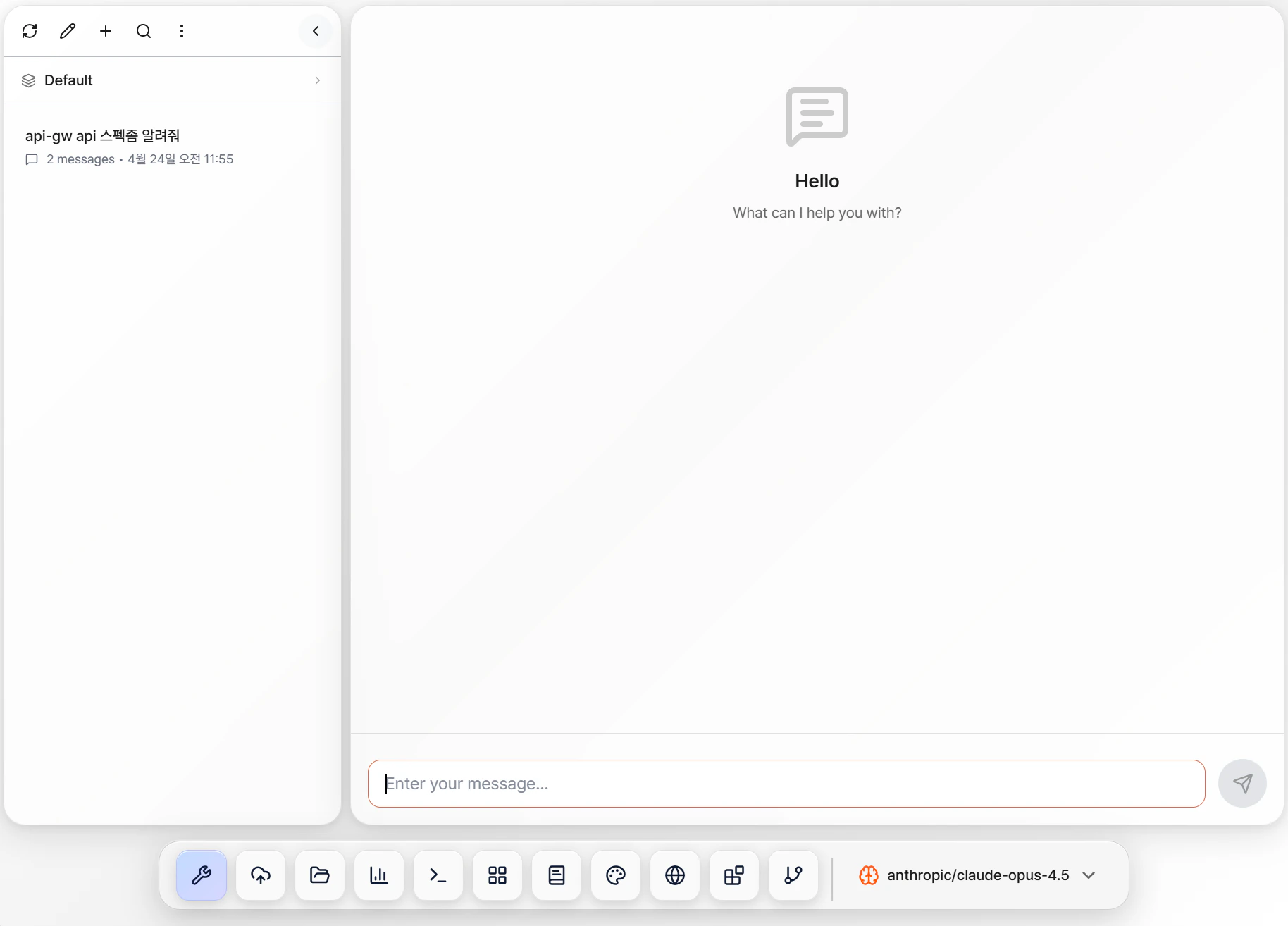 에이전트는 Console에서 생성·배포한 후 해당 URL로 접근합니다. 자세한 생성 절차는 [Console → Agent Ops](/console/agent-ops) 참고.
## 주요 구성
* **사이드바**: 채팅 히스토리 / Workspace 전환
* **채팅 영역**: 메시지 입력, 세션 정보, 메시지 복사/편집
* **모델 선택기**: Anthropic, OpenAI 등 LLM 모델 선택
* **하단 툴바**: 12개 기능 패널 (MCP/Storage/Analytics/PowerPoint 등)
* **사용자 메뉴**: 계정·스케줄러·Memory facts 등 7개 항목
## 바로 쓰는 활용 레시피
**시나리오**: 업로드한 PDF 문서를 분석해 슬라이드 보고서 생성.
1. **Temp Files** 패널에 PDF 업로드
2. **Analytics** 패널에서 `index_document` 로 인덱싱
3. 채팅에 "이 문서 핵심 3가지 정리해줘"
4. **PowerPoint** 패널에 템플릿 업로드 → "위 내용을 5 슬라이드로 만들어줘"
5. 생성된 .pptx를 Temp Files에서 다운로드
관련: [Analytics](/agent-chat/toolbar/analytics) / [PowerPoint](/agent-chat/toolbar/powerpoint)
**시나리오**: CSV 데이터 드롭 + 자연어로 쿼리.
1. **Analytics** 패널의 **TABLES** 드롭 영역에 CSV 투입
2. 채팅: "지역별 매출 합계 Top 5"
3. 에이전트가 `execute_query` 로 DuckDB SQL 실행 (Tool Call 카드로 표시)
4. 결과를 표·차트로 받기
관련: [Analytics](/agent-chat/toolbar/analytics) / [Tool Call](/agent-chat/ui/tool-call)
**시나리오**: 최신 정보 + 내 문서를 종합해 답변.
1. **Web Search** 패널 활성화
2. **Storage** 패널에서 참조할 Storage 선택
3. 채팅: "최신 ISMS 인증 요건을 우리 문서와 대조해줘"
4. 에이전트가 `web_search` + `search_documents` 순차 호출
관련: [Web Search](/agent-chat/toolbar/web-search) / [Storage](/agent-chat/toolbar/storage)
**시나리오**: 프롬프트로 블로그 썸네일 생성.
1. **Image Generation** 패널 활성화
2. 채팅: "AI 에이전트 주제 블로그 썸네일, 16:9 비율, 파란톤"
3. 생성된 이미지는 `generated_images/` 폴더에 저장 → 다운로드
관련: [Image Generation](/agent-chat/toolbar/image-gen) / [Temp Files](/agent-chat/toolbar/temp-files)
**시나리오**: 원격 서버에서 배포 스크립트 실행.
1. **Remote Hosts** 패널에서 Bash 탭 → 로컬에서 `npx seahorse-bash-client connect`
2. 채팅: "deploy 스크립트 실행하고 결과 요약해줘"
3. 에이전트가 원격 터미널 세션으로 명령 실행
관련: [Remote Hosts (Bash)](/agent-chat/toolbar/remote-hosts)
**시나리오**: 매주 월요일 09:00 주간 지표 자동 보고.
1. 위의 CSV 분석 플로우를 **Flow Studio** 에 저장
2. **사용자 메뉴 → Scheduler** 에서 Cron `0 9 * * MON` 지정
3. 매주 실행 결과가 Slack 으로 자동 전송 (MCP Slack 등록 필요)
관련: [Flow Studio](/agent-chat/toolbar/flow-studio) / [Scheduler](/agent-chat/user-menu/scheduler)
## 자주 쓰는 팁
| 목적 | 빠른 경로 |
| --------------------- | --------------------------------------------------------------- |
| **사용자 선호·컨텍스트 장기 저장** | [Memory facts](/agent-chat/user-menu/memory-facts) — 다음 세션에도 기억 |
| **과거 대화 찾기** | [Search](/agent-chat/ui/search) — 의미 기반 검색 (유사도 %) |
| **모델 단가·비용 확인** | [모델 선택기](/agent-chat/ui/model-selector) / [Billing](/billing) |
| **프롬프트 커스터마이즈** | [Prompt settings](/agent-chat/user-menu/prompt-settings) |
| **Workspace 공유** | [Team Control](/agent-chat/user-menu/team-control) |
| **도구 호출 디버깅** | [Tool Call 카드](/agent-chat/ui/tool-call) — 입력/출력/에러 확인 |
## 깊이 있는 레시피
위 빠른 예시 말고 실무 자동화 단계별 가이드가 필요하면 [**조합 레시피**](/agent-chat/recipes) 참고:
* [PostgreSQL 반복 쿼리 자동화](/agent-chat/recipes/postgres-sql-automation)
* [RAG + 웹 검색 통합 답변](/agent-chat/recipes/rag-web-search)
* [Slack 알림 자동화](/agent-chat/recipes/slack-notification)
* (작성 중) 대량 문서 인덱싱·요약 / 템플릿 제안서 생성 / GitHub PR 리뷰 요약
## 관련 문서
* [Console → Agent Ops](/console/agent-ops) — 에이전트 생성·배포
* [MCP Tools (Tool Management)](/console/agent-ops/agent-tool) — 외부 도구 등록
* [Billing](/billing) — 모델·API 과금
Seahorse Agent Chat 조합 레시피 — 여러 도구·MCP·패널을 엮어 실무 작업을 자동화하는 패턴 모음
에이전트 채팅 하단 툴바는 12개의 기능 패널로 구성되어 있습니다. 각 패널은 독립된 도구 모음을 제공합니다
Agent Chat 화면의 3개 주요 영역 (사이드바 / 채팅 영역 / 모델 선택기) + 하단 툴바 + 사용자 메뉴
사이드바 상단 메뉴 버튼에서 접근하는 계정·설정 메뉴
에이전트는 Console에서 생성·배포한 후 해당 URL로 접근합니다. 자세한 생성 절차는 [Console → Agent Ops](/console/agent-ops) 참고.
## 주요 구성
* **사이드바**: 채팅 히스토리 / Workspace 전환
* **채팅 영역**: 메시지 입력, 세션 정보, 메시지 복사/편집
* **모델 선택기**: Anthropic, OpenAI 등 LLM 모델 선택
* **하단 툴바**: 12개 기능 패널 (MCP/Storage/Analytics/PowerPoint 등)
* **사용자 메뉴**: 계정·스케줄러·Memory facts 등 7개 항목
## 바로 쓰는 활용 레시피
**시나리오**: 업로드한 PDF 문서를 분석해 슬라이드 보고서 생성.
1. **Temp Files** 패널에 PDF 업로드
2. **Analytics** 패널에서 `index_document` 로 인덱싱
3. 채팅에 "이 문서 핵심 3가지 정리해줘"
4. **PowerPoint** 패널에 템플릿 업로드 → "위 내용을 5 슬라이드로 만들어줘"
5. 생성된 .pptx를 Temp Files에서 다운로드
관련: [Analytics](/agent-chat/toolbar/analytics) / [PowerPoint](/agent-chat/toolbar/powerpoint)
**시나리오**: CSV 데이터 드롭 + 자연어로 쿼리.
1. **Analytics** 패널의 **TABLES** 드롭 영역에 CSV 투입
2. 채팅: "지역별 매출 합계 Top 5"
3. 에이전트가 `execute_query` 로 DuckDB SQL 실행 (Tool Call 카드로 표시)
4. 결과를 표·차트로 받기
관련: [Analytics](/agent-chat/toolbar/analytics) / [Tool Call](/agent-chat/ui/tool-call)
**시나리오**: 최신 정보 + 내 문서를 종합해 답변.
1. **Web Search** 패널 활성화
2. **Storage** 패널에서 참조할 Storage 선택
3. 채팅: "최신 ISMS 인증 요건을 우리 문서와 대조해줘"
4. 에이전트가 `web_search` + `search_documents` 순차 호출
관련: [Web Search](/agent-chat/toolbar/web-search) / [Storage](/agent-chat/toolbar/storage)
**시나리오**: 프롬프트로 블로그 썸네일 생성.
1. **Image Generation** 패널 활성화
2. 채팅: "AI 에이전트 주제 블로그 썸네일, 16:9 비율, 파란톤"
3. 생성된 이미지는 `generated_images/` 폴더에 저장 → 다운로드
관련: [Image Generation](/agent-chat/toolbar/image-gen) / [Temp Files](/agent-chat/toolbar/temp-files)
**시나리오**: 원격 서버에서 배포 스크립트 실행.
1. **Remote Hosts** 패널에서 Bash 탭 → 로컬에서 `npx seahorse-bash-client connect`
2. 채팅: "deploy 스크립트 실행하고 결과 요약해줘"
3. 에이전트가 원격 터미널 세션으로 명령 실행
관련: [Remote Hosts (Bash)](/agent-chat/toolbar/remote-hosts)
**시나리오**: 매주 월요일 09:00 주간 지표 자동 보고.
1. 위의 CSV 분석 플로우를 **Flow Studio** 에 저장
2. **사용자 메뉴 → Scheduler** 에서 Cron `0 9 * * MON` 지정
3. 매주 실행 결과가 Slack 으로 자동 전송 (MCP Slack 등록 필요)
관련: [Flow Studio](/agent-chat/toolbar/flow-studio) / [Scheduler](/agent-chat/user-menu/scheduler)
## 자주 쓰는 팁
| 목적 | 빠른 경로 |
| --------------------- | --------------------------------------------------------------- |
| **사용자 선호·컨텍스트 장기 저장** | [Memory facts](/agent-chat/user-menu/memory-facts) — 다음 세션에도 기억 |
| **과거 대화 찾기** | [Search](/agent-chat/ui/search) — 의미 기반 검색 (유사도 %) |
| **모델 단가·비용 확인** | [모델 선택기](/agent-chat/ui/model-selector) / [Billing](/billing) |
| **프롬프트 커스터마이즈** | [Prompt settings](/agent-chat/user-menu/prompt-settings) |
| **Workspace 공유** | [Team Control](/agent-chat/user-menu/team-control) |
| **도구 호출 디버깅** | [Tool Call 카드](/agent-chat/ui/tool-call) — 입력/출력/에러 확인 |
## 깊이 있는 레시피
위 빠른 예시 말고 실무 자동화 단계별 가이드가 필요하면 [**조합 레시피**](/agent-chat/recipes) 참고:
* [PostgreSQL 반복 쿼리 자동화](/agent-chat/recipes/postgres-sql-automation)
* [RAG + 웹 검색 통합 답변](/agent-chat/recipes/rag-web-search)
* [Slack 알림 자동화](/agent-chat/recipes/slack-notification)
* (작성 중) 대량 문서 인덱싱·요약 / 템플릿 제안서 생성 / GitHub PR 리뷰 요약
## 관련 문서
* [Console → Agent Ops](/console/agent-ops) — 에이전트 생성·배포
* [MCP Tools (Tool Management)](/console/agent-ops/agent-tool) — 외부 도구 등록
* [Billing](/billing) — 모델·API 과금
Seahorse Agent Chat 조합 레시피 — 여러 도구·MCP·패널을 엮어 실무 작업을 자동화하는 패턴 모음
에이전트 채팅 하단 툴바는 12개의 기능 패널로 구성되어 있습니다. 각 패널은 독립된 도구 모음을 제공합니다
Agent Chat 화면의 3개 주요 영역 (사이드바 / 채팅 영역 / 모델 선택기) + 하단 툴바 + 사용자 메뉴
사이드바 상단 메뉴 버튼에서 접근하는 계정·설정 메뉴